Tips • April 9, 2026
How To Setup A Matchmaking Database: Fields, Client Types, Lists & Advanced Search
This guide explains how to set up a modern matchmaking software database — including profile fields, match preference fields, client types, lists, tags, and advanced search filters — so your system works exactly the way your business needs it to.
By Kair Mourtazov, SmartMatchApp Product Specialist
Reading time: 7 minutes
30-Second Summary (TL;DR)
A well-structured matchmaking CRM makes it easy to deliver high-quality matches and scale your operations efficiently.
- Align profile fields and match preference fields to power accurate matching
- Use client types to organize segments and define matching logic
- Automate tags/lists for consistent, hands-free segmentation
- Apply AND/OR logic correctly for precise and flexible search results
- Save key searches to streamline your team’s daily workflows
When set up correctly, your matchmaking software becomes a scalable matching engine—not just a database.
Who Is This Guide For?
If you are in the business of making meaningful connections, setting up a matchmaking software platform for your business or community correctly is mission-critical. Customizing these core elements to fit your specific use case ensures your platform performs at its best, delivers higher-quality matches, and scales efficiently as your network grows.
This guide is for any organization focused on connecting people, such as:
- Dating matchmaking services
- Business introduction networks
- Mentoring programs
- Professional or career networks
- Membership associations
- Peer and health support groups
- Communities
Table of Contents
- Why Your CRM Setup Determines Your Matching Quality
- Profile Fields: The Engine Behind Every Match
- Match Preference Fields: How Criteria Drive the Algorithm
- Client Types and Sidebar Groups: Organizing a Multi-Segment Database
- Lists and Tags: Segmentation That Works on Autopilot
- Advanced Search and AND/OR Logic for Precise Filtering
- Quick-Reference Setup Checklist
- Frequently Asked Questions
1. Why Your Database Setup Determines Your Matching Quality
A matchmaking CRM is built for flexibility — but that flexibility only works in your favour when the underlying structure is correct. The platform adapts to many business models, but it needs accurate, well-organized data to do so.
The three most common problems businesess and communities run into — and the ones this guide is designed to solve:
Searches return poor match results.
This almost always traces back to fields and match preferences that aren't properly aligned. If the algorithm can't compare two data points on opposite sides of a match, it simply won't surface that connection.
The database gets disorganized quickly.
Without consistent client types and tagging rules, profiles pile up without meaningful structure. Filtering becomes unreliable, and your team starts doing work the system should handle automatically.
Segmentation is manual and inconsistent.
If tags are only applied by hand, they'll be inconsistent. Automation fixes this — but only if tagging rules are set up correctly from the start.
This webinar episode, courtesy of the leading matchmaking platform, SmartMatchApp, walks through how to customize your matchmaking CRM database for peak productivity.

2. Profile Fields: The Engine Behind Every Match
What Are Profile Fields?
Profile fields are the fundamental data units inside every client record in a matchmaking CRM. They store everything your team knows about a person and directly inform what the matching engine can compare between profiles.
Profile fields describe who the person is: age, gender, location, industry, education level, relationship status, years of experience, company size, investment capacity — any attribute relevant to your business model.
Field Types Available in Modern Matchmaking Software
Most platforms support a wide range of field formats:
- Dropdown (single-select): gender, membership status, country
- Dropdown (multi-select): interests, skills, languages spoken
- Text input: bio, personal notes, job title
- Number: age, income range, years of experience, team size
- Date: date of birth, registration date
- URL: LinkedIn profile, company website
- File upload: résumé, contract, ID, headshot
Most advanced matchmakiung platfroms, such as SmartMatchApp, allow to create an unlimited number of custom fields and group them into logical sections. Fields can also be reordered anytime, so your workflow can evolve without rebuilding your system.
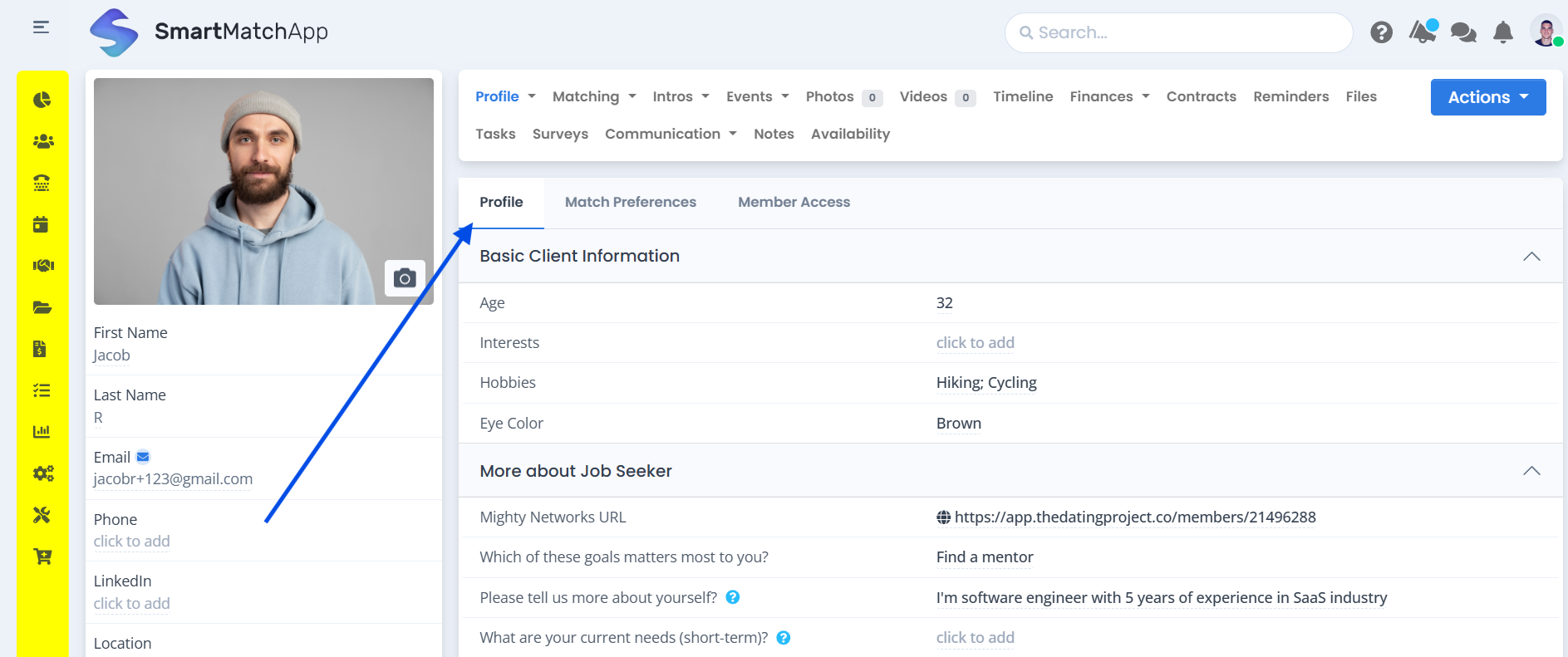
User inteface highliging the ‘Profile Fields’ setting to easily build custom matchmaking profile fields. Courtesy SmartMatchApp
The Client Inspector: Faster Profile Scanning
Once your fields are configured, activate a quick-preview panel (often shown as an eye icon). This allows your team to view up to 10 key fields without opening a full profile.
Pro tip:
Select these fields based on what your team actually checks during matching sessions - not just what feels important to collect. The goal is speed, not completeness.
3. Match Preference Fields: How Criteria Drive the Algorithm
Match preference fields are a separate but equally important layer. While profile fields describe who the person is, match preference fields describe what they are looking for.
Together, these two layers power the matching algorithm.
Examples:
-
Preferred age range
-
Preferred location
-
Required industry
-
Relationship or engagement type
-
Budget or investment range
-
Language preference
-
Experience level
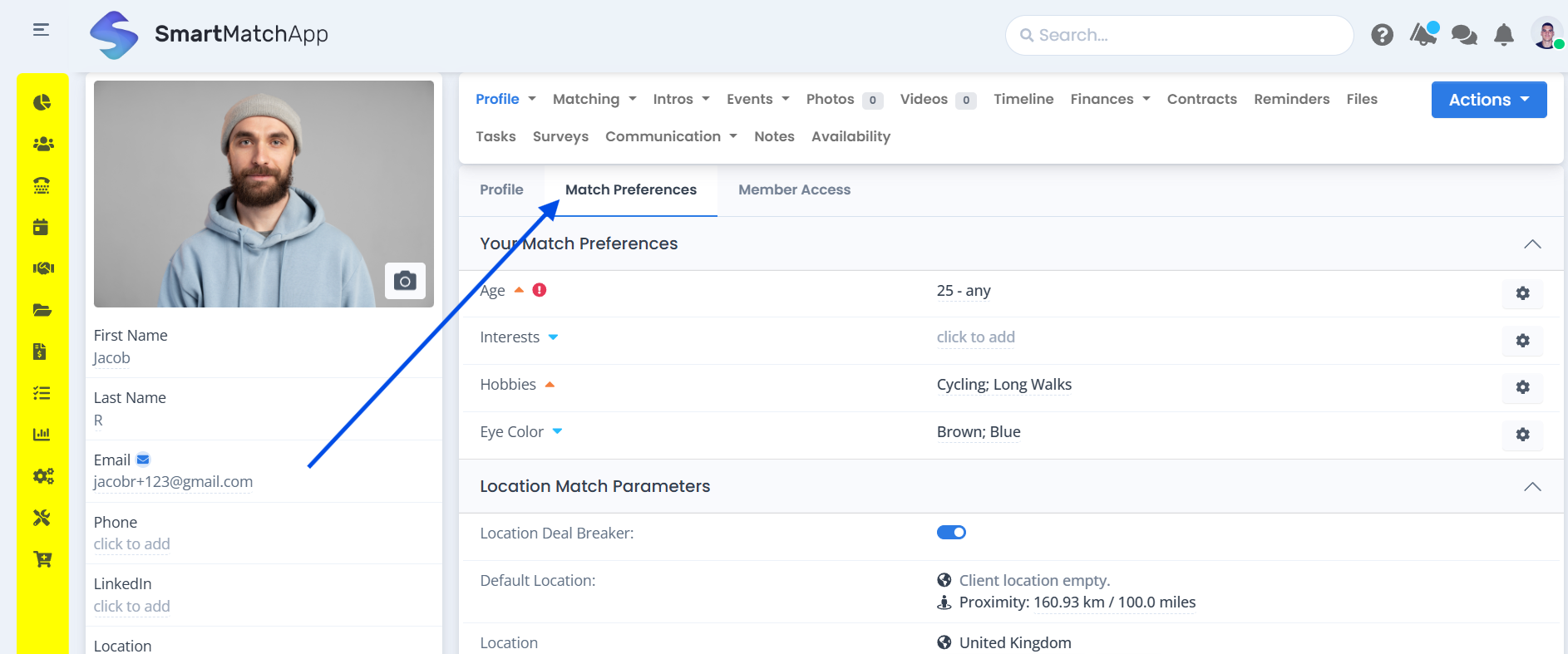
User inteface highliging the ‘Match Preference Fields’ setting being used in the matchmaking databse setup. Courtesy: SmartMatchApp.
The Rule That Most Users Miss
If a data dimension exists only as a profile field but has no corresponding match preference field (or vice versa), it cannot be used as a matching criterion. The algorithm needs both sides of the equation.
👉 For example: if you collect "Industry" as a profile field, you also need "Preferred Industry" as a match preference field for that attribute to influence who gets matched with whom.
Whenever you add a new field to your database, ask: 👉 does this need a preference counterpart? If the answer is yes, create both at the same time.
If a data point exists only as a profile field—or only as a preference—it cannot be used for matching.
The system needs both sides.
4. Client Types and Sidebar Groups: Organizing a Multi-Segment Database
What Are Client Types?
Not every contact in your matchmaking database is the same kind of person. The Types system lets you define distinct categories and apply them to profiles — so that the platform treats each segment appropriately. Client types define categories such as:
- Individual clients (dating, mentoring, peer support)
- Corporate partners or employers
- Investors or accelerators (business matching)
- Event attendees or applicants
- Association or network members
- Unscreened leads (pre-approval queue)
Assigning a type to a profile controls three things automatically:
- Which fields are visible on that profile
- Which submission form is associated with that category
- How the matching engine treats them
For instance, paid clients can be matched with each other while unscreened leads are held in a separate queue.
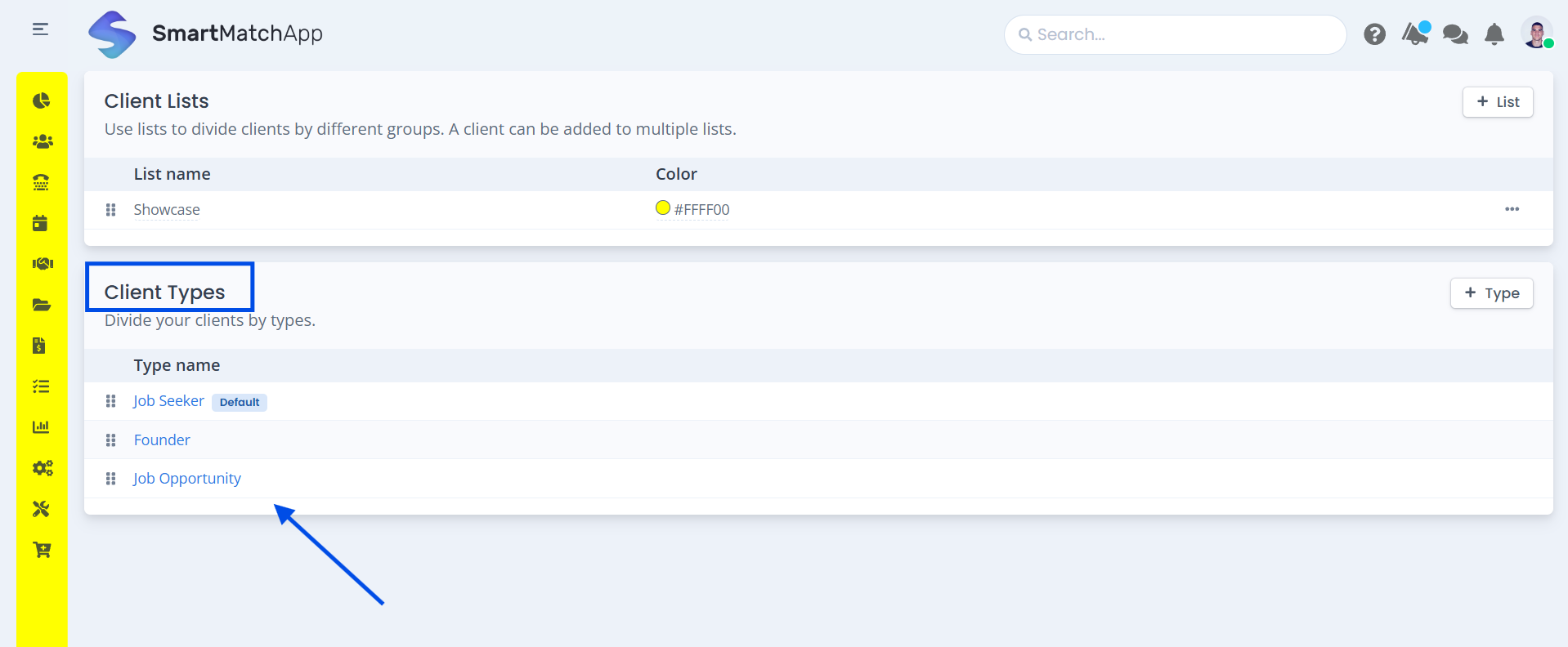
User inteface example, custom Client Types applied in settings inside the matchmaking databse setup. Courtesy: SmartMatchApp
Customizing the Profile Sidebar
Every client profile has a left sidebar that provides an at-a-glance summary when the profile is open. This sidebar is fully customizable — your team decides which fields appear there.
Best practice is to use the sidebar for identity and contact information: name, email, phone number, location, and 2–3 key qualifying attributes. The goal is to answer the question "who is this person?" in under five seconds.
Keep the sidebar to around 10 fields. More than that starts to slow down the review process. Deeper information belongs inside the full profile, not in the sidebar.
The sidebar should answer: “Who is this person?” in under 5 seconds.
Why Types Matter for Matching Logic
Types do more than just organize your database visually. They also define matching boundaries and can be configured so that only certain types are compared against each other — which prevents irrelevant results and keeps your algorithm working on meaningful connections.
For example:
-
Paid clients match with paid clients
-
Leads are excluded
This ensures the algorithm focuses only on relevant matches.
If you run a hybrid platform (for example, matching individual clients with corporate partners), types are what allow you to maintain separate field structures, separate forms, and separate matching rules — all within the same database.
5. Lists and Tags: Segmentation That Works on Autopilot
What Are Lists ?
Lists — also referred to as tags — let you group and segment profiles across your database without altering their type, fields, or any other attribute. A single profile can belong to multiple lists simultaneously, making tags a highly flexible segmentation tool.
Tags can be applied manually by your team at any time, or automatically through submission form rules, Zapier integrations, or built-in automation engine.
Practical Tag Categories for Matchmaking
- Source tracking — Know where every profile came from Website Form, Referral — [Partner Name], Event — [Event Name], Added via Zapier, Imported from CSV
- Status and tier — Know where every client stand: Paid Client, Free Trial, VIP, Inactive, Pending Payment
- Funnel stage — Know where every lead is in your pipeline New Lead, Screened, Onboarded, Actively Matching, Paused, Completed
- Campaign and outreach — Track engagement and responses: Newsletter Subscriber, Responded to Campaign — Q1 2025, Attended Webinar
Automatic Tagging at the Point of Entry
The most effective tagging strategy is automation at the moment a profile is created. Every submission form can be configured to automatically apply one or more tags when a new profile enters your database.
This means:
- A client who fills your website contact form is instantly tagged Website Lead
- A profile synced from a Zapier integration is tagged Zapier — [Source Name]
- An attendee who registers for an event is tagged Event — [Event Name]
No manual work. No inconsistency. Every profile is correctly categorized from the moment it enters your system.
Using Tags to Manage Matching Pools
Tags aren't just for organization — they're also an active filtering tool during the matching process. You can restrict a match search to profiles that carry a specific tag.
Tags also control matching visibility. For example - only show Paid Client profiles as potential matches), or exclude profiles that carry a tag you don't want included (for example, exclude On Hold or Inactive).
-
Include: Paid clients
-
Exclude: On hold, inactive
This creates clean, controlled matching pools without needing separate databases.
This lets you create curated matching pools without needing separate databases or complex workarounds. Lists (tags) let you segment profiles without changing structure. A single profile can belong to multiple lists, making tags extremely flexible.
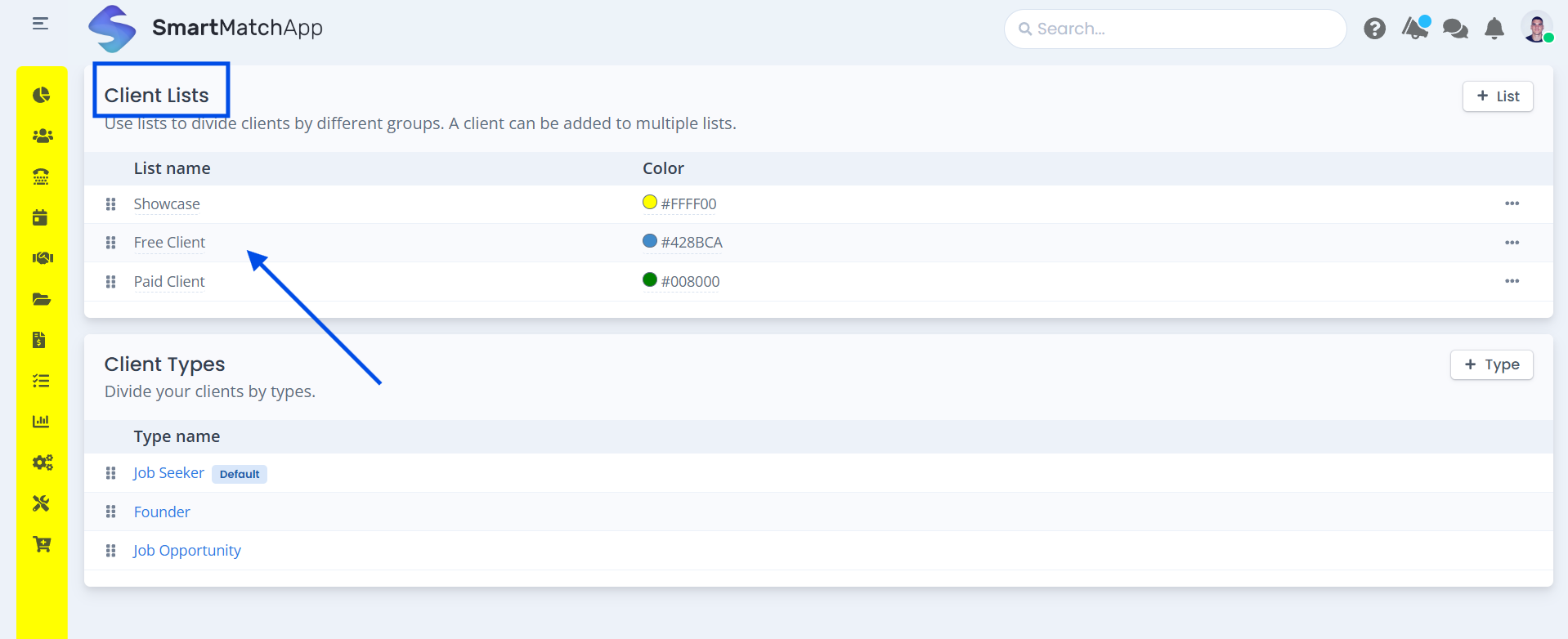
Example, how custom Client Lists and Tags are applied in settings inside the matchmaking databse setup. Courtesy: SmartMatchApp
6. Advanced Search and AND/OR Logic for Precise Filtering
An advanced search engine lets you filter your entire database in seconds using any combination of profile fields, match preferences, location, client type, and tags. Results update instantly, and searches can be saved and reused — so your most frequently used filters are always one click away.
Building Compound Searches with Multiple Conditions
The real power of search comes from combining multiple conditions using AND/OR logic. Understanding the difference is critical to getting accurate results.
AND logic narrows results — every condition must be true for a profile to appear. Use AND when you need precision:
- Paid Client AND Profile Complete AND Not Yet Matched
- Industry: Finance AND Location: New York AND Available for Introduction
OR logic broadens results — any matching condition qualifies a profile. Use OR for wider outreach:
- Free Trial OR Lead — Pending Screening
- Responded to Campaign A OR Responded to Campaign B
Exclusion logic removes specific profiles from results regardless of other conditions:
- Has tag Active but NOT tag On Hold
- Has tag Paid Client but NOT tag Matched — Pending Feedback
Common mistake: Combining AND and OR logic in a single search without thinking through the order of operations. If your results seem too broad or too narrow, revisit which conditions are AND and which are OR.
Saving and Reusing Searches
Once you've built a useful filter combination, save it. The matchmaking database stores advanced searches and reapplies them in a single click. Over time, your team builds a library of pre-configured views — one for daily matching reviews, one for follow-up outreach, one for monthly reporting — without rebuilding filters from scratch each time.
What You Can Filter By
Advanced search supports filtering across variety of matching criteria :
- Any profile field (dropdowns, numbers, dates, text keywords)
- Any match preference field
- Client type
- Lists and tags (with AND/OR/exclusion logic)
- Location (city, region, country, radius)
- Profile completeness and activity status
- Date ranges (created, last updated, last contacted)
7. Quick-Reference Matchmaking Software Setup Checklist
Use this checklist when setting up or auditing your matchmaking CRM, a proven reference from leading matchmaking platforms like SmartMatchApp, to ensure your database structure is optimized for accurate matching and efficient workflows.
Profile Fields
- Fields created for all core client attributes
- Fields organized into logical groups
- Fields reordered to match team workflow
- Client Inspector configured with the 10 most time-critical fields
Match Preference Fields
- Preference counterparts created for every filterable profile field
- Both sides of each matching dimension confirmed (profile field + preference field)
Client Types
- Types defined for each distinct audience segment
- Correct fields mapped to each type
- Matching boundaries configured (which types match with which)
Lists and Tags
- Standard tags defined for source, status, funnel stage, and campaign tracking
- Automatic tagging configured on all submission forms
- Zapier/API tags defined for every external integration
- Tag exclusion rules reviewed for matching pool accuracy
Advanced Search
- Common filter combinations built and saved
- AND/OR logic verified for each saved search
- Exclusion tags applied where needed
8. Frequently Asked Questions
How many custom matchmaking fields can I create in a matchmaking plaform?
Modern matchmaking platforms provide unlimited custom fields and preferences.
Can different client types have different fields?
Yes. It is the main point of the matchmaking process to enable versitile matching.
What is profile vs preference fields?
Profile = who they are. Preference = what they want
How many tags per profile?
Advanced matchmaking platforms provides unlimited lists and tags for the best matching results.
Can matchmaking software use tags to automate the process?
Yes. It is a key feature of a high quality matchmaking engine.
What fields support matching?
Today pretty much al the fields play role in matching. Such as dropdowns, numbers, dates, location, and open text.
Do matchmaking CRM platforms support multiple languages?
Modern platforms such as SmartMatchApp provides multi-language options to their clients worldwide.
Summary
A well-structured matchmaking CRM database is the foundation of effective matching.
When your fields are aligned, your client types are clearly defined, your tags are automated, and your search logic is correct, your system becomes a true extension of your matchmaking process—not just a place to store contacts.
Key principles:
-
Profile and preference fields must mirror each other
-
Client types define structure and matching boundaries
-
Automated tagging eliminates inconsistency
-
AND/OR logic enables precise filtering
Continue Reading
This guide is part of a series on how communities increase engagement using AI matchmaking software. The full framework covers five proven steps — from building a structured member database, to automating introductions and feedback collection, scaling with automation, and capturing member data with seamless intake forms.
👉 👉 Start with the full framework: How Communities Increase Engagement Using AI Matchmaking Software — 5 Proven Steps
More in this series:
- How to Master Introductions, Presets & Match Automation in Your Matchmaking Software
- How to Set Up AI Matching Criteria in Your Community Matchmaking Platform
- How to Automate Your Daily Operations with Tasks and Workflows in a Matchmaking CRM
- How to Build and Brand Your Client Intake Forms in a Matchmaking CRM
Next Step
If you want to explore how AI matchmaking can be tailored to your community, modern platforms like SmartMatchApp provide end-to-end solutions for managing data, automating introductions, and scaling engagement.
👉 Book a demo to see how it works in your specific use case.