Consigli • 9 maggio 2026
Come Impostare i Criteri di Abbinamento AI nella Tua Piattaforma di Matchmaking Comunitario
Un punteggio di abbinamento del 95% su tutto il tuo database non è un successo — è una configurazione errata. Questa guida copre come costruire criteri di abbinamento AI abbastanza specifici da differenziare effettivamente i tuoi membri e far emergere connessioni che apprezzano.
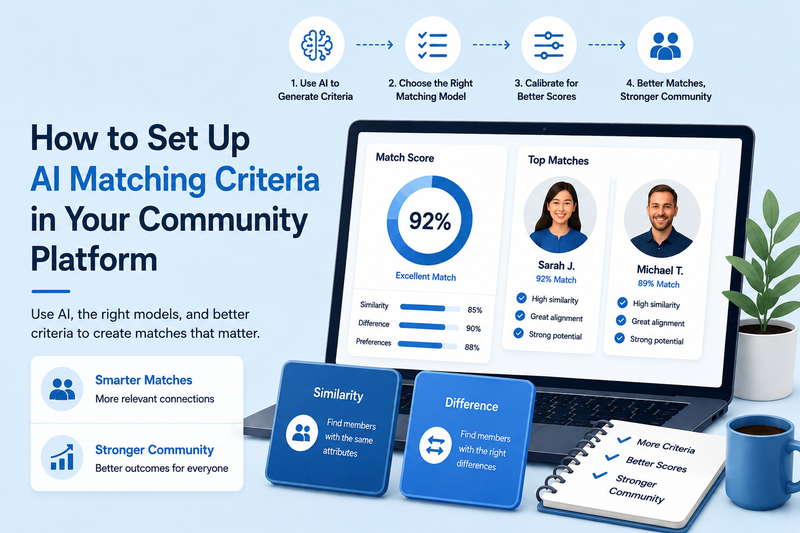
Di Kair Mourtazov, Specialista di Prodotto SmartMatchApp
Tempo di lettura: 6 minuti
Riassunto di 30 Secondi (TL;DR)
Un cattivo abbinamento non è quasi mai un problema del software — è un problema di configurazione. Questo articolo spiega come utilizzare strumenti di intelligenza artificiale per generare i campi di abbinamento in pochi minuti, come scegliere il modello di abbinamento giusto per ciascun criterio e come calibrare la configurazione affinché i punteggi di abbinamento abbiano effettivamente un significato. Basato su casi d'uso reali di clienti dell'industria moderna del matchmaking.
Indice dei Contenuti
-
Perché la Maggior Parte delle Configurazioni di Abbinamento Non Rende
-
Usa l'IA per Costruire i Tuoi Criteri — Prima di Toccare la Piattaforma
-
I Due Modelli di Abbinamento che Devi Conoscere
-
Campi di Preferenza di Abbinamento Semplici: Evita la Duplicazione
-
Perché Più Criteri = Punteggi Migliori
-
Come Aggiornare una Comunità Attiva Senza Ricominciare da Capo
-
Risultati del Mondo Reale
-
FAQ
- Riepilogo
-
Prossimo Passo
1. Perché la Maggior Parte delle Configurazioni di Abbinamento Non Rende
Il software raramente è il problema. Quando i gestori di comunità dicono che l'abbinamento "non funziona", la causa principale è quasi sempre una delle tre seguenti:
-
Troppi pochi campi di abbinamento — solitamente troppo semplici come posizione, settore e titolo di lavoro
-
Il modello di abbinamento sbagliato applicato ai criteri sbagliati
-
Punteggi di abbinamento così uniformemente alti da essere privi di significato
Tutti e tre sono risolvibili senza cambiare piattaforma o ricostruire da zero. Questo articolo copre ciascuno di essi, basandosi su schemi di configurazione reali incontrati regolarmente con nuovi clienti — specialmente quelli al di fuori dell'industria degli incontri, dove i criteri di abbinamento non sono così intuitivi.

Questo video di SmartMatchApp, un esempio leader nell'industria del software di matchmaking, esplora come migliorare la piattaforma della tua comunità utilizzando l'IA per personalizzare i tuoi criteri e amplificare il punteggio di compatibilità.
2. Usa l'IA per Costruire i Tuoi Criteri — Prima di Toccare la Piattaforma
Questo è il trucco che la maggior parte dei gestori di comunità non conosce.
Prima di aprire la tua piattaforma di matchmaking, apri qualsiasi assistente IA — ChatGPT, Gemini, Claude — e descrivi lo scopo della tua comunità. Poi chiedi di generare un elenco di campi di abbinamento con scelte di risposta. Ci vogliono circa 30 secondi per scrivere il prompt e restituisce un elenco di criteri completo in meno di un minuto.
Struttura del prompt che funziona:
"Crea un elenco di campi per abbinare [tipo di membro] tra loro in una comunità per [scopo della comunità]. Includi scelte di risposta specifiche per ciascun campo."
Esempio: Per una comunità di infermieri professionisti focalizzata sul mentorship e lo sviluppo di carriera, un prompt come questo restituisce campi come:
-
Specialità infermieristica (Cura Critica, Emergenza/Trauma, Medico-Chirurgica, Pediatria, Assistenza Domiciliare, Oncologia, Salute Mentale, Parto & Maternità, Sala Operatoria/Perioperatoria, Salute Comunitaria)
-
Anni di esperienza clinica (0–2 anni, 3–5 anni, 6–10 anni, 11–20 anni, 20+ anni)
-
Ruolo attuale (Infermiera di Reparto, Capo Infermiera, Infermiera Professionista, Manager Infermieristico, Educatore Clinico, Direttore Infermieristico)
-
Focus del mentorship (Transizione a una nuova specialità, Leadership & gestione, Equilibrio vita-lavoro & prevenzione del burnout, Ricerca & pratica basata su evidenze, Avanzamento di carriera, Ritorno alla pratica)
-
Formato preferito per gli incontri (Videochiamata, Chiamata telefonica, In persona, Messaggistica asincrona)
-
Disponibilità mensile (1–2 ore, 3–4 ore, 5+ ore)
-
Regione geografica (per comunità dove la posizione è importante)
-
Ruolo nella comunità (Mentore, Mentee, Pari — determina come viene applicato l'abbinamento differenziale)
Dodici campi con scelte già suddivise — pronti per essere copiati e incollati direttamente nella piattaforma. Un brainstorming manuale raramente è così specifico e veloce.
Una volta che hai questo elenco, rivedilo, rimuovi ciò che non si adatta, aggiungi qualsiasi cosa specifica per la comunità e dai priorità in base alla rilevanza. Questo diventa il tuo piano di costruzione prima di aprire la piattaforma. L'approccio funziona per ogni tipo di comunità: reti di investitori, associazioni di ex-alunni, gruppi di supporto tra pari, programmi di accelerazione — la logica del prompt è la stessa indipendentemente dal settore.
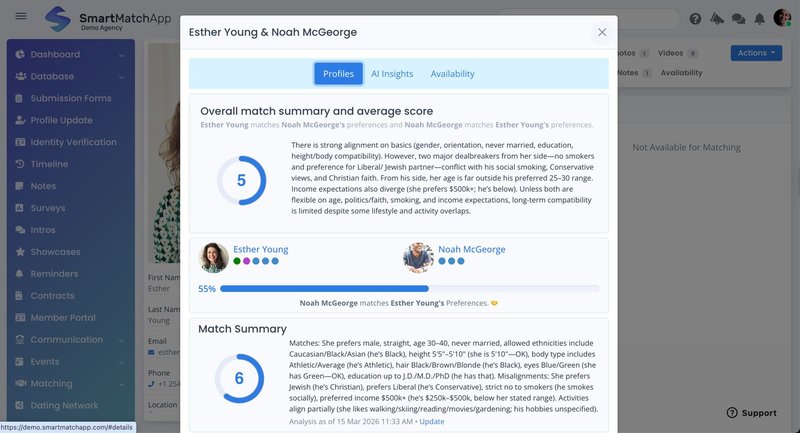
Esempio di dettagli di abbinamento tra due profili all'interno dell'interfaccia che mostra il riepilogo complessivo dell'abbinamento AI e il punteggio medio. Per gentile concessione di SmartMatchApp.
3. I Due Modelli di Abbinamento che Devi Conoscere
Questa è la decisione più importante nell'intera configurazione — e la più comunemente trascurata.
Prima di configurare qualsiasi campo, chiediti una domanda: un grande abbinamento su questo criterio significa che due persone condividono la stessa risposta, o che le loro risposte sono intenzionalmente diverse?
Abbinamento per Somiglianza — Quando la Somiglianza è il Segnale
Usalo quando due membri si cercano perché condividono qualcosa. Stessa specialità. Stesso focus geografico. Stesso stadio di carriera. L'abbinamento è forte perché i profili si allineano.
Buoni esempi di campi di abbinamento per somiglianza:
-
Specialità clinica o settore industriale
-
Regione geografica o fuso orario
-
Formato o frequenza preferita per gli incontri
-
Focus professionale primario
Abbinamento per Differenza — Quando la Differenza è il Punto
Usalo quando due membri si connettono perché uno ha ciò di cui l'altro ha bisogno. Un mentee con un anno di esperienza che cerca un mentore con dieci. Un fondatore che cerca un investitore. Un nuovo membro che cerca supporto tra pari da qualcuno più avanti.
Buoni esempi di campi di abbinamento per differenza:
-
Anni di esperienza (programmi di mentorship)
-
Stadio di finanziamento (reti investitore-fondatore)
-
Livello di competenza (tutoring, coaching)
-
Ruolo di supporto (consulente vs. consigliato)
L'errore che uccide l'abbinamento di mentorship: configurare "anni di esperienza" come un campo di somiglianza. Il risultato è che i mentee vengono abbinati con altri mentee — un punteggio tecnicamente alto, un'introduzione praticamente inutile.
L'abbinamento per differenza richiede due campi: uno sul profilo ("Ho X anni di esperienza") e uno nelle preferenze ("Sto cercando qualcuno con X anni di esperienza"). La differenza tra questi due punti dati è ciò che l'algoritmo utilizza.
Molte comunità hanno bisogno di entrambi i modelli. Una rete professionale che facilita connessioni tra pari e relazioni di mentorship utilizzerà l'abbinamento per somiglianza per i criteri tra pari e l'abbinamento per differenza per i criteri di mentorship — nella stessa piattaforma, configurati su campi diversi.
4. Campi di Preferenza di Abbinamento Semplici: Evita la Duplicazione
Per ogni criterio di somiglianza, c'è un modo più intelligente di configurarlo: il campo di preferenza di abbinamento semplice.
La configurazione standard chiede a un membro la stessa domanda due volte — una volta sul loro profilo ("qual è la tua specialità?") e una volta nelle loro preferenze ("quale specialità desideri in un abbinamento?"). Per i criteri di somiglianza, la risposta è la stessa entrambe le volte. Chiedere due volte crea attrito e dati incoerenti.
Un campo di preferenza di abbinamento semplice cattura il criterio una volta, direttamente all'interno del livello delle preferenze. Il membro seleziona i propri attributi una volta, e il sistema utilizza quelle selezioni sia per rappresentare chi sono sia per trovare abbinamenti compatibili.
Quando usarlo: Qualsiasi criterio di somiglianza dove entrambe le parti di un abbinamento darebbero la stessa risposta — area di specialità, focus geografico, preferenze di incontro, stile di comunicazione, aree di interesse.
Quando non usarlo: Criteri di abbinamento per differenza. Se il valore deriva dall'asimmetria — mentorship, consulenza, investimento — hai ancora bisogno della struttura a due campi.
Nel software di matchmaking moderno come SmartMatchApp, i campi di preferenza di abbinamento semplice vivono indipendentemente dal livello del profilo — rendendo la distinzione esplicita e riducendo la lunghezza del modulo di onboarding senza perdere profondità di abbinamento.
5. Perché Più Criteri = Punteggi Migliori
Più campi sembrano più attrito. In realtà è il contrario.
Un sistema di abbinamento con dieci campi mostrerà frequentemente una compatibilità del 90–100% in gran parte del database. Se quei dieci campi sono ampi — settore generale, posizione approssimativa, stadio di carriera — la maggior parte dei membri si allineerà su molti di essi. Un punteggio del 95% su dieci campi generici è rumore, non segnale.
Quando espandi a venti o trenta campi con attributi più granulari e specifici per la comunità, i punteggi si distribuiscono naturalmente. I membri genuinamente compatibili ottengono un punteggio dell'80–95%. Sovrapposizioni moderate ottengono un punteggio del 55–70%. L'algoritmo produce un elenco classificato che è effettivamente utile perché i criteri sono abbastanza specifici da differenziare.
Come controllare la tua calibrazione:
Esegui suggerimenti di abbinamento su un campione di profili di membri. Se la maggior parte ottiene un punteggio superiore all'85%, i tuoi criteri sono troppo ampi o troppo pochi. Aggiungi specificità — sotto-specialità, intervalli di esperienza più stretti, tipi di obiettivi più precisi — e riesegui. Un sistema ben calibrato mostra una variazione significativa dei punteggi, circa 50–95%, con suggerimenti principali chiaramente differenziati dalla media.
6. Come Aggiornare una Comunità Attiva Senza Ricominciare da Capo
Hai già un'iscrizione consolidata? Migliorare i tuoi criteri di abbinamento non significa un re-onboarding dirompente.
L'approccio giusto è additivo:
-
Crea i nuovi campi nel tuo software di matchmaking
-
Costruisci un preset che includa solo quei nuovi campi
-
Invia una richiesta di aggiornamento del profilo mirata al tuo database esistente utilizzando quel preset — i membri vedono solo le nuove domande, non un modulo di re-onboarding completo
-
Presentalo semplicemente: "Abbiamo migliorato il nostro processo di abbinamento — completare alcuni nuovi campi ti garantirà connessioni migliori."
I membri che apprezzano le loro connessioni lo completeranno. I nuovi criteri si attivano progressivamente man mano che i dati si riempiono — nessuna ricostruzione, nessuna interruzione.
Fallo diventare un'abitudine. Aggiungere da uno a tre campi per trimestre, basandosi su ciò che i membri ti dicono rende preziosa una connessione, mantiene il sistema calibrato mentre la comunità evolve.
7. Risultati del Mondo Reale
Blockchain Game Alliance ha generato oltre 1.000 nuove connessioni tra membri dopo aver implementato l'abbinamento potenziato dall'IA. Un volume completamente fuori portata con la revisione manuale — il sistema ha reso la generazione di connessioni ripetibile e scalabile.
TBLI Group, una rete globale di investimenti a impatto, ha utilizzato l'abbinamento strutturato dall'IA su criteri di investimento multidimensionali — focus settoriale, stadio, mandato geografico, tesi di impatto. Il risultato: un aumento del 146% delle connessioni e un flusso di affari triplicato. Non solo più abbinamenti — ma più precisi.
Entrambi i risultati sono derivati dall'implementazione del software di matchmaking di SmartMatchApp e dall'assicurazione della qualità della configurazione. CRM generici e criteri generici avrebbero prodotto risultati generici.
8. FAQ
Hai bisogno di competenze tecniche per impostare i criteri di abbinamento IA?
No. Le decisioni che contano — quali criteri utilizzare, quale modello si applica, come ponderare i campi — sono giudizi sulla tua comunità, non tecnici. La piattaforma gestisce l'algoritmo una volta che i tuoi input sono in atto.
Qual è l'errore di configurazione di abbinamento IA più comune?
Applicare l'abbinamento per somiglianza a criteri che richiedono l'abbinamento per differenza. Il caso più chiaro è il mentorship: se "anni di esperienza" è impostato come un campo di preferenza semplice, i mentee si abbinano con altri mentee — tecnicamente un punteggio alto, praticamente un'introduzione inutile. Hai bisogno di due campi: uno che cattura ciò che il membro ha, uno che cattura ciò che sta cercando.
Quanti campi di abbinamento dovrebbe avere una comunità all'inizio?
Dieci a quindici, configurati correttamente per il giusto modello di abbinamento. Se i punteggi si raggruppano sopra l'85%, aggiungi criteri più specifici. Costruisci profondità prima della larghezza.
Qual è la differenza tra abbinamento per somiglianza e abbinamento per differenza?
L'abbinamento per somiglianza connette membri che condividono lo stesso attributo — stessa specialità, stessa regione, stesso stadio di carriera. L'abbinamento per differenza connette membri basandosi su una differenza deliberata — un mentee che cerca un mentore più esperto, un fondatore che cerca un investitore. La distinzione determina come ciascun campo è costruito nel sistema.
Come aggiungi nuovi criteri di abbinamento a un database di membri esistente?
Invia una richiesta di aggiornamento basata su preset che include solo i nuovi campi. I membri compilano un modulo breve e mirato piuttosto che un re-onboarding completo. I tassi di completamento sono alti perché la richiesta è piccola e la ragione è chiara.
9. Riepilogo
Un buon abbinamento non inizia con l'algoritmo — inizia con i criteri.
Usa l'IA per generare un elenco completo prima di costruire qualsiasi cosa. Scegli il modello di abbinamento giusto per ciascun campo. Usa campi di preferenza semplici per ridurre la duplicazione sui criteri di somiglianza. Aggiungi abbastanza specificità affinché i tuoi punteggi di abbinamento classifichino effettivamente le persone in modo significativo. Mantieni i criteri aggiornati man mano che la tua comunità cresce.
Il sistema gestisce il calcolo. La configurazione è tua da fare bene.
Continua a Leggere
Questa guida fa parte di una serie su come le comunità aumentano il coinvolgimento utilizzando software di matchmaking IA. Il quadro completo copre cinque passaggi comprovati — dalla costruzione di un database di membri strutturato, all'automazione delle introduzioni e della raccolta di feedback, alla scalabilità con l'automazione, e alla cattura dei dati dei membri con moduli di ingresso senza soluzione di continuità.
👉 👉 Inizia con il quadro completo: Come le Comunità Aumentano il Coinvolgimento Utilizzando Software di Matchmaking IA — 5 Passaggi Comprovati
Altro in questa serie:
- Come Configurare un Database di Matchmaking: Campi, Tipi di Clienti, Liste & Ricerca Avanzata
- Come Padroneggiare Introduzioni, Preset & Automazione degli Abbinamenti nel Tuo Software di Matchmaking
- Come Automatizzare le Tue Operazioni Quotidiane con Compiti e Flussi di Lavoro in un CRM di Matchmaking
- Come Costruire e Brandizzare i Tuoi Moduli di Accoglienza Clienti in un CRM di Matchmaking
👉 Guarda questo webinar complementare per scoprire più funzionalità IA implementate da aziende leader nel software di matchmaking come SmartMatchApp: Potenzia il Matchmaking con Criteri Personalizzati & Compatibilità IA

Prossimo Passo
Se vuoi esplorare come il matchmaking IA può essere adattato alla tua comunità, piattaforme moderne come SmartMatchApp forniscono soluzioni end-to-end per gestire i dati, automatizzare le introduzioni e scalare il coinvolgimento.
👉Prenota una demo per vedere come funziona nel tuo caso d'uso specifico.