Поради • 20 травня 2026 р.
Як створити та брендувати форми прийому клієнтів у мачмейкінг CRM
Дізнайтеся, як створювати, брендувати та розповсюджувати форми прийому клієнтів у вашій мачмейкінг CRM — захоплюйте правильні дані при поданні та наповнюйте ваш двигун підбору з першого дня.
Автор: Каїр Муртазов, спеціаліст з продукту SmartMatchApp
Час читання: 6 хвилин
Коротко
Ваша форма прийому клієнтів — це перша реальна взаємодія потенційного учасника з вашою організацією. Сучасна CRM для мачмейкінгу дозволяє створювати повністю брендовані, багатомовні форми прийому — з користувацькими полями, збором платежів, автоматизованими відповідями та візуальним стилем — і вбудовувати їх безпосередньо на вашому вебсайті або ділитися ними як окремим посиланням. Задавайте правильні питання на початку, і кожен матч, який ви робите далі, стає швидшим і точнішим. Ось як створити таку, що працює.
Зміст
-
Чому ваша форма прийому є основою вашої мачмейкінгової системи
-
Що налаштувати перед створенням форми
-
Загальні налаштування: що відбувається до і після подання
-
Поля: задавання правильних питань у правильному порядку
-
Брендування вашої форми: з нуля або з шаблону
-
Вбудовування проти поширення: як розповсюджувати вашу форму
-
Приклад прийому від початку до кінця
1. Чому ваша форма прийому є основою вашої мачмейкінгової системи
Кожен матч, який ви робите, настільки хороший, наскільки хороші дані за ним. І ці дані існують лише тому, що хтось заповнив форму.
Це робить вашу форму прийому одним з найважливіших компонентів у всій вашій мачмейкінговій операції. Зробіть це правильно — задайте правильні питання, в правильному порядку, з правильним рівнем тертя — і ваша база даних наповнюється структурованими, відповідними даними. Зробіть це неправильно, і ви або потонете в неповних профілях, або вручну переслідуєте учасників за інформацією, яку ви повинні були захопити на початку.
Спеціалізована CRM для мачмейкінгу ставиться до форм прийому інакше, ніж загальні конструктори форм. Кожне поле безпосередньо пов'язане з вашим мачмейкінговим двигуном — атрибути профілю та переваги матчів, які система використовує для розрахунку сумісності, ранжування пропозицій та створення AI-резюме матчів. Ніяких відключених електронних таблиць. Ніякого ручного введення даних. Кожна відповідь, яку дає учасник, стає негайно використовуваною точкою даних.
Орієнтир: ваша форма прийому повинна робити дві речі одночасно — робити подання легким для учасника і робити легким для вашої системи їх з'єднання.
Це стосується кожного типу мачмейкінгу та організації спільноти. Мачмейкери для знайомств, професійні мережеві спільноти, програми наставництва, мережі підтримки однолітків, організації охорони здоров'я, інвестиційні групи та платформи волонтерства стикаються з тією ж проблемою: захоплення достатньої кількості правильної інформації на етапі прийому, щоб створити значущі зв'язки в подальшому.
2. Що налаштувати перед створенням вашої форми
Перед створенням вашої першої форми потрібно налаштувати дві речі: поля профілю та поля переваг матчів.
Поля профілю описують особу — хто вони, де вони знаходяться, чим займаються і яке у них минуле. Поля переваг матчів описують, що вони шукають в інших — критерії, які ваш алгоритм мачмейкінгу використовує для розрахунку сумісності.
Ці поля є сировиною, з якої ваша форма прийому черпає. Ви не пишете питання з нуля в конструкторі форм — ви вибираєте, які з ваших існуючих полів включити, в якому порядку і з яким рівнем деталізації. Кожна відповідь безпосередньо потрапляє в точку даних, яку можна шукати, фільтрувати та відповідати всередині вашої CRM.
👉 Якщо ваші поля ще не налаштовані, зробіть це спочатку. Форма прийому є механізмом доставки вашої архітектури даних, а не її заміною.
3. Загальні налаштування: що відбувається до і після подання
Як тільки ваші поля налаштовані, створення форми починається з вкладки Налаштування — параметрів, які контролюють досвід учасника навколо форми, а не тільки всередині неї.
Налаштування повідомлень:
-
Назва та опис форми — вітальне повідомлення або короткий контекст, показаний учасникам перед початком
-
Мова за замовчуванням — більшість платформ підтримують англійську, французьку, іспанську, німецьку, голландську та італійську, дозволяючи обслуговувати багатомовні спільноти без створення окремих форм
-
Повідомлення для існуючих клієнтів — автоматично показується, коли хтось намагається повторно подати, використовуючи електронну пошту, яка вже є у вашій базі даних, запобігаючи дублюванню без будь-якого ручного втручання
-
Повідомлення про підтвердження — користувацький текст, показаний після успішного подання, який може включати наступні кроки, URL-адресу перенаправлення або подяку
-
Автовідповідь електронною поштою — автоматично надсилається в поштову скриньку учасника після подання, підтверджуючи отримання і встановлюючи очікування з першого моменту
-
Повідомлення електронною поштою — ваша команда отримує сповіщення про кожне нове подання, з налаштовуваною темою та текстом повідомлення, які можуть автоматично включати деталі подання за допомогою коротких кодів
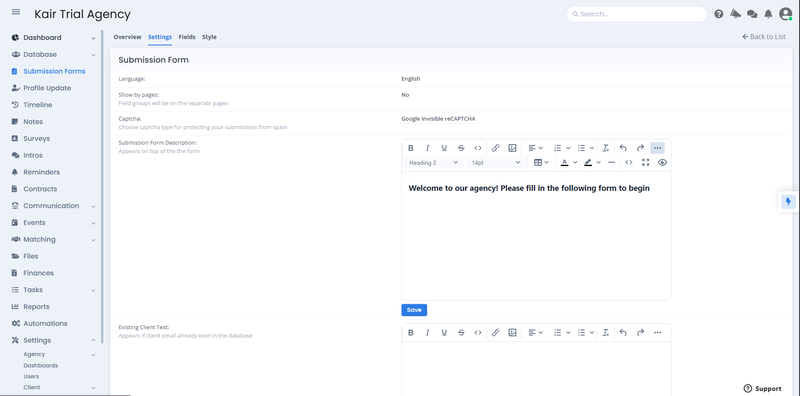
Приклад вкладки Налаштування форми подання для мачмейкінгу — налаштуйте параметри, такі як мова, захист від спаму, користувацьке вітальне повідомлення та текст, показаний повертаючимся клієнтам, які намагаються повторно подати. Надано SmartMatchApp
Операційні налаштування:
-
Запит на оновлення профілю — автоматично надсилає учасникам посилання для заповнення додаткових розділів профілю після початкового короткого подання. Спочатку захоплюйте основне, заповнюйте решту пізніше
-
Збір платежів — членські внески або платежі за заявку можуть бути зібрані безпосередньо у формі через інтегровану обробку платежів
-
Доступ до порталу учасників — автоматично генеруйте облікові дані для входу та надсилайте учасникам посилання для управління їхнім профілем з першого дня
-
Автоматичне підтвердження або ручний перегляд — виберіть, чи нові подання потрапляють у вашу активну базу даних негайно або утримуються для попереднього перегляду
-
Перевірка віку та налаштування конфіденційності — встановіть мінімальні вимоги до віку та підключіть ключ Google Tag Manager для аналітики та відповідності
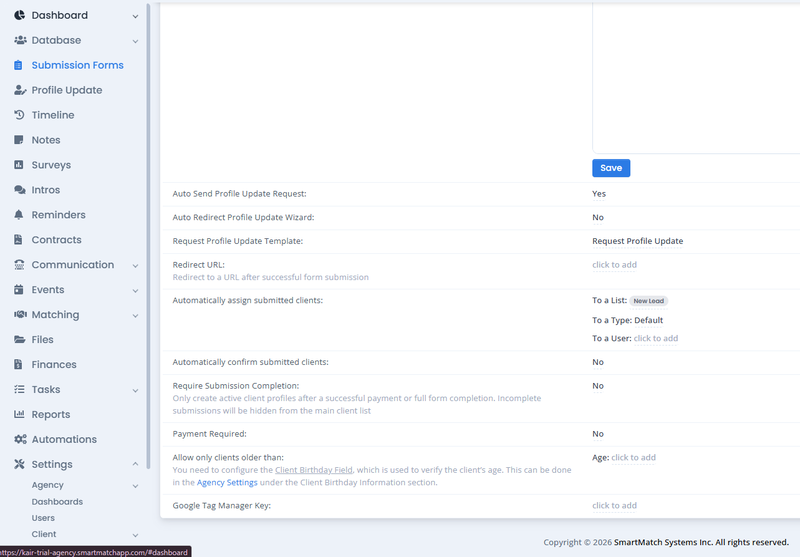
Приклад операційних налаштувань форми подання для мачмейкінгу — контролюйте, що відбувається в момент подання клієнтом, включаючи автоматичне призначення до списку, запити на оновлення профілю, робочий процес підтвердження, вимоги до платежів та перевірку віку. Надано SmartMatchApp
💡 Практична порада: зберігайте вашу початкову форму до п'яти-семи полів, що охоплюють найбільш критичні точки даних. Автоматично запускайте запит на оновлення профілю для всього іншого. Учасники набагато частіше завершують прийом у два короткі кроки, ніж проходять через 30-польову форму за один раз.
4. Поля: задавання правильних питань у правильному порядку
Вкладка Поля — це місце, де ви створюєте анкету, яку ваші учасники фактично бачать.
Тут ви вибираєте, які поля профілю та переваг матчів включити, організовуєте їх у логічні групи та контролюєте, як кожне поле представляється учаснику.
Ключові елементи управління для кожного поля:
-
Обов'язкове проти необов'язкового — позначте поля, які мають найбільше значення для мачмейкінгу, як обов'язкові, щоб профілі ніколи не були без критичних точок даних
-
Текст допомоги — коротка інструкція під будь-яким полем, яка зменшує плутанину та покращує рівень завершення, особливо для більш обдуманих питань
-
Порядок і групування полів — перетягуйте поля в будь-яку послідовність і організовуйте їх під названими заголовками розділів, щоб довші форми виглядали структурованими, а не перевантаженими
-
Видимість типу поля — бачте з першого погляду, чи є кожне поле випадаючим списком, текстовим введенням, мультивибором, завантаженням фото, відео або полем розташування
Ви можете додавати поля профілю, поля переваг матчів, поля розташування, фото та відео поля, а також користувацькі групи полів — все з одного інтерфейсу.
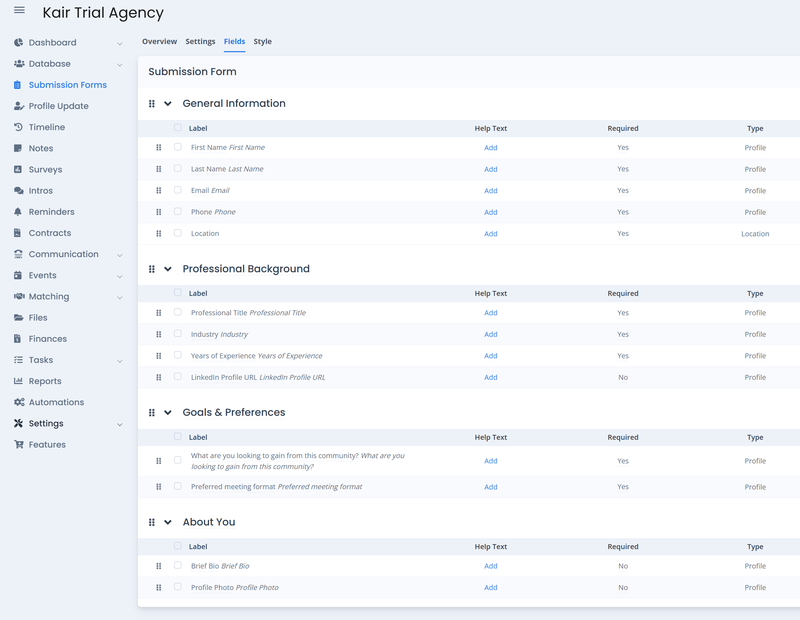
Вкладка Поля форми подання для мачмейкінгу — поля організовані в логічні групи, кожна з яких має налаштовуваний текст допомоги, статус обов'язковості та тип поля, всі вони взяті безпосередньо з вашої існуючої бібліотеки полів профілю. Надано SmartMatchApp
Примітка щодо фото та відео полів: сучасні платформи для мачмейкінгу тепер підтримують перетягування файлів безпосередньо у формі прийому, замінюючи старий підхід "клік для вибору". Учасники можуть перетягувати файли прямо у форму без навігації по файлових браузерах — значне зменшення тертя, особливо на мобільних пристроях, де вибір файлів історично був найпоширенішою точкою відмови.
Принцип порядку: починайте з найпростіших питань (ім'я, розташування, основний досвід) і переходьте до більш обдуманих (переваги, цілі, конкретні критерії). Як тільки хтось відповів на десять простих питань, вони вже досить зацікавлені, щоб відповісти на складніші.
5. Брендування вашої форми: з нуля або з шаблону
Раніше підходи до стилізації форм прийому вимагали користувацького CSS — технічного бар'єру, який робив візуальну кастомізацію недоступною для більшості користувачів без досвіду розробки. Сучасні платформи для мачмейкінгу тепер включають візуальний конструктор стилів: інтерфейс без коду, який дозволяє контролювати кожен візуальний елемент вашої форми без написання жодного рядка коду.
Що ви можете налаштувати:
-
Колір фону — підберіть палітру вашого бренду точно, використовуючи шестигранні коди з вашої бренд-книги
-
Радіус межі — контролюйте, наскільки округлими або квадратними виглядають краї форми
-
Шрифт і вага — виберіть з часто використовуваних веб-шрифтів, щоб відповідати типографії вашого вебсайту
-
Відображення назви групи — показуйте або приховуйте заголовки розділів, або змінюйте їх колір, щоб створити візуальну ієрархію
-
Мітки полів проти заповнювачів — виберіть, чи показують поля постійні мітки, текст заповнювача всередині них, або обидва
-
Кольори тексту введення, межі та фону полів — стилізуйте кожен елемент введення незалежно від загального фону форми
-
Кнопка подання — налаштуйте текст кнопки (змініть "Подати" на "Застосувати", "Приєднатися" або будь-яку мітку, яка відповідає голосу вашої організації), колір фону та колір тексту
-
Відстань між полями та групами — налаштуйте вертикальні проміжки між полями та розділами, щоб контролювати щільність і простір для дихання по всій формі
Результатом є форма, яка виглядає як природне продовження вашого вебсайту — не як загальне вбудоване рішення третьої сторони, вставлене на вашу сторінку.
Якщо створення з нуля здається занадто складним, використовуйте шаблон стилю. Більшість платформ пропонують бібліотеку професійно розроблених зовнішніх виглядів форм — чистих і мінімальних, темних і сучасних, градієнтних і кольорових — які можна застосувати одним кліком. Шаблони миттєво встановлюють всі візуальні параметри до узгодженої початкової точки, і кожен елемент залишається редагованим після застосування. Якщо шаблон наближає вас на 80% до вигляду вашого бренду, застосуйте його і внесіть цілеспрямовані коригування звідти. Це найшвидший шлях від порожньої форми до брендованої.
💡 Для встановлених брендів: використовуйте точні шестигранні коди з вашої бренд-книги в кольорових вибірках по всьому конструктору стилів. Кожне кольорове поле приймає шестигранні значення, тому ваша форма може точно відповідати палітрі вашого вебсайту — без необхідності в наближенні.
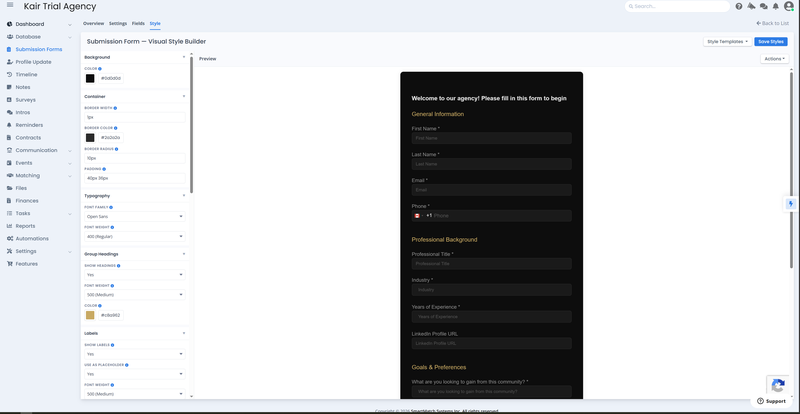
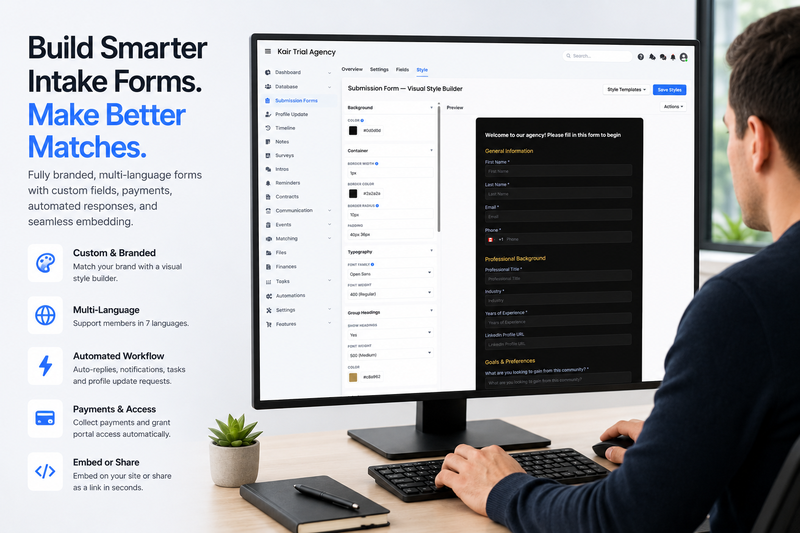
Приклад візуального конструктора стилів форми подання — налаштуйте фон, типографію, кольори заголовків груп, мітки та відстані на лівій панелі, переглядаючи брендовану форму в реальному часі на правій панелі. CSS не потрібен. Надано SmartMatchApp
6. Вбудовування проти поширення: як розповсюджувати вашу форму
Після створення та стилізації ваша форма має два шляхи розповсюдження — жоден з них не вимагає технічної експертизи.
Варіант 1: Вбудувати на ваш вебсайт Кожна форма прийому генерує код для вбудовування — короткий HTML-фрагмент, який відображає форму на вашому вебсайті так, ніби вона була створена нативно. Ваш розробник може вставити його за кілька хвилин, або ви можете зробити це самостійно в більшості конструкторів вебсайтів (Webflow, WordPress, Squarespace, Wix), додавши користувацький блок коду.
💡 Немає розробника? Немає проблем. Скопіюйте ваш код для вбудовування, вставте його в ChatGPT або будь-якого AI-асистента, і запитайте: "Куди саме я повинен вставити це в бекенд моєї [платформи вебсайту]?" Більшість конструкторів вебсайтів роблять це одноетапною операцією, як тільки ви знаєте, куди його розмістити — і AI-асистент може провести вас через це за менше ніж дві хвилини.
Варіант 2: Поділитися як пряме посилання Кожна форма також має окрему URL-адресу, яка відкриває форму на окремій сторінці, розміщеній платформою. Скопіюйте посилання і поділіться ним через електронну пошту, соціальні мережі або QR-код на живому заході — учасники заповнюють форму, не відвідуючи ваш вебсайт.
З візуальним конструктором стилів окремі форми тепер є дійсно презентабельним брендованим досвідом. Учасники, які отримують стилізоване окреме посилання, бачать форму, яка виглядає наміреною та професійною, навіть без вебсайту за нею.
Примітка для існуючих користувачів: якщо ви раніше стилізували вбудовані форми, використовуючи користувацький CSS на вашому вебсайті, ці стилі продовжують працювати так само, як і раніше. Вбудований конструктор стилів є доповненням, а не заміною — обидва підходи залишаються повністю підтримуваними.
7. Приклад прийому від початку до кінця
Ось як працює повний процес прийому всередині SmartMatchApp, однієї з провідних спеціалізованих платформ CRM для мачмейкінгу:

-
Поля профілю та переваг матчів налаштовані в CRM перед створенням форми
-
Створюється нова форма прийому і налаштовується у вкладці Загальні — мова, повідомлення про підтвердження, автовідповідь та електронні повідомлення про сповіщення команди налаштовані
-
Поля додаються з існуючої бібліотеки полів, організовуються в логічні групи, з позначеними обов'язковими полями та доданим текстом допомоги, де це потрібно
-
Форма стилізується за допомогою візуального конструктора — кольори бренду застосовуються через шестигранні коди, вибирається шрифт, текст кнопки оновлюється, щоб відповідати голосу організації
-
Стилізована форма вбудовується на вебсайт організації за допомогою згенерованого коду для вбудовування; окреме посилання зберігається для прямого поширення на заходах та через електронну пошту
-
Учасник подає форму — їхній профіль автоматично створюється в CRM, команда отримує сповіщення, учасник отримує електронний лист підтвердження, і завдання з онбордингу призначається менеджеру з успіху
-
Автоматично запускається запит на оновлення профілю, спонукаючи учасника заповнити додаткові поля у своєму темпі
-
Як тільки профіль завершено, мачмейкінговий двигун виявляє сумісні пропозиції на основі структурованих даних, захоплених на етапі прийому

У цьому відео, Тім та Микола досліджують Форми подання, показуючи, як збирати дані клієнтів один раз і автоматично відображати їх у вашій CRM для мачмейкінгу. Це допомагає спростити онбординг клієнтів, зменшити ручне введення даних та підтримувати точність профілів з першого дня.
Реальний приклад: Національна асоціація бізнес-леді Латинської Америки (NLBWA) Результат: збільшення зустрічей та знайомств у 3 рази
Впровадивши структуровані форми прийому разом з автоматизованими онбордингом та мачмейкінговими робочими процесами, NLBWA значно покращила участь членів та якість зв'язків — результат, який можливий лише тоді, коли дані, захоплені на етапі прийому, є чистими, структурованими та негайно використовуваними мачмейкінговим двигуном.
Часті запитання
Чи потрібні мені навички програмування для створення або стилізації форми прийому для мачмейкінгу? Ні. Сучасні платформи CRM для мачмейкінгу включають візуальний конструктор форм та редактор стилів без коду. Ви можете налаштовувати поля, кастомізувати кольори, шрифти та макети, і генерувати код для вбудовування — все без написання CSS або HTML.
Яка різниця між полем профілю та полем переваг матчів у формі прийому? Поля профілю захоплюють, хто є учасником — їхній досвід, атрибути та характеристики. Поля переваг матчів захоплюють, що вони шукають в інших. Обидва безпосередньо потрапляють в алгоритм мачмейкінгу. Включення обох типів дає системі все необхідне для генерації точних оцінок сумісності з моменту подання.
Якою довгою повинна бути форма прийому для мачмейкінгу? Зберігайте початкову форму до п'яти-десяти полів, що охоплюють найбільш критичні точки даних. Використовуйте запит на оновлення профілю, щоб зібрати додаткові деталі на наступному етапі. Учасники значно частіше завершують прийом у два короткі кроки, ніж проходять через довгу форму за один раз.
Чи можна використовувати ту ж форму для різних типів учасників? Більшість платформ підтримують кілька форм, дозволяючи створювати різні досвіди прийому для різних типів учасників — клієнтів, наставників, інвесторів, волонтерів — кожна з яких використовує відповідні поля для цього типу профілю.
Що відбувається, якщо хтось намагається подати форму двічі? CRM для мачмейкінгу виявляє дублікати подань за адресою електронної пошти та автоматично блокує повторний вхід. Ви можете налаштувати користувацьке повідомлення для повертаючихся користувачів або налаштувати автоматизацію, яка надсилає їм запит на оновлення профілю — перетворюючи потенційний дублікат у можливість збагачення даних.
Чи можу я збирати платежі в момент подання форми? Так, якщо ваша платформа включає інтеграцію платежів. Більшість спеціалізованих CRM для мачмейкінгу підтримують збір членського внеску або платежу за заявку безпосередньо у формі прийому, з можливістю налаштування опису платежу, суми та прийнятих методів.
Висновок
Кожне знайомство, яке ви робите, кожен матч, який ви пропонуєте, кожен зв'язок, що призводить до значущого результату — все починається з даних. І ці дані починаються з форми.
Добре побудована форма прийому не просто збирає інформацію. Вона структурує її, маршрутизує і негайно використовує — заповнюючи вашу базу даних, запускаючи ваш робочий процес онбордингу та живлячи ваш мачмейкінговий двигун з моменту, коли хтось натискає "подати". Коли форма також брендована, з низьким тертям і доступна на будь-якому пристрої, вона перестає бути адміністративним кроком і стає першим досвідом вашої організації, яка працює з наміром.
Це стандарт, до якого варто прагнути.
Продовжуйте читання
Ця стаття є заключною частиною серії про те, як мачмейкінгові бізнеси та спільноти масштабують свої операції за допомогою спеціалізованого програмного забезпечення.
👉 Почніть з повної структури: Як спільноти підвищують залученість за допомогою AI мачмейкінгового програмного забезпечення — 5 перевірених кроків
Більше в цій серії:
- Як налаштувати базу даних для мачмейкінгу: поля, типи клієнтів, списки та розширений пошук
- Як освоїти знайомства, пресети та автоматизацію матчів у вашому мачмейкінговому програмному забезпеченні
- Як налаштувати критерії AI мачмейкінгу у вашій платформі мачмейкінгу для спільноти
- Як автоматизувати ваші щоденні операції за допомогою завдань та робочих процесів у CRM для мачмейкінгу
Бажаєте побачити форми прийому, автоматизований онбординг та повну мачмейкінгову систему в дії на живій платформі? SmartMatchApp спеціально створена для мачмейкінгових бізнесів, спільнот та організацій наставництва, які потребують ефективного збору даних учасників та інтелектуального їх зіставлення.
👉 Забронюйте безкоштовний ознайомчий дзвінок і дізнайтеся, як це застосовується до вашого конкретного процесу прийому.