ヒント • 2026年5月14日
マッチメイキングCRMでタスクとワークフローを使って日常業務を自動化する方法
クライアントの受付とオンボーディングからフォローアップ、コーチング、販売まで、マッチメイキングCRMでタスク、カンバンボード、ワークフローを使って日常業務を自動化する方法を学びましょう。
カイル・ムルタゾフ、SmartMatchAppプロダクトスペシャリスト
読了時間:6分
要約
タスク、カンバンボード、そして自動化機能が組み込まれたマッチメイキングCRMは、クライアントの受け入れやオンボーディングからフォローアップ、コーチング、セールスに至るまで、日々の業務を消耗させる手作業を排除します。受け入れフォームを自動タスク作成、チーム割り当て、通知に接続し、チームは毎朝すべてが既に整理され動いている状態でスタートできます。ここでは、その設定方法を詳しく説明します。
目次
-
なぜタスク管理はマッチメイキングCRMに組み込まれるべきなのか
-
フォーム送信後の自動タスク作成の仕組み
-
ボード、ステータス、カンバンビューの設定
-
チェックリストとテンプレートを使用してプロセスを標準化する
-
クライアントをパイプラインで進める:オンボーディングからセールスまで
-
タスク内での非同期チームコミュニケーション
-
高度なタスクフィルタリングとチームの可視性
-
日々の業務のエンドツーエンドの例
1. なぜタスク管理はマッチメイキングCRMに組み込まれるべきなのか
Asana、Trello、Monday.com、Zohoなどの別々のツールで日々の業務を管理することは、不要な摩擦を生み出します。システム間のコンテキストスイッチは、フォローアップが見逃され、クライアントが抜け落ちる機会を生み出します。
マッチメイキングCRMに直接組み込まれたタスク管理モジュールは、この問題を根本から解決します。すべてのタスクはクライアントプロフィールにリンクされています。すべてのチェックリスト項目、ステータス変更、チームノートは、クライアントの受け入れデータ、紹介履歴、コミュニケーションログの隣に存在し、必要な人全員に見える状態で一元管理されています。
目標は、複雑なエンジニアリングチームのためのプロジェクト管理ソフトウェアを置き換えることではありません。マッチメイキングビジネスを運営する上で、日々の調整の負担を排除し、より迅速でエラーの少ない運営を実現することです。
これは、デートマッチメーカー、プロフェッショナルネットワーキングコミュニティ、メンターシッププログラム、ピアサポートネットワーク、医療機関など、マッチメイキングやコミュニティ主導の組織全体に適用されます。すべての組織が直面する共通の課題は、動く部分が多すぎて、手作業が多すぎて、クライアントがどの時点でどこにいるのかを把握する可視性が不足していることです。
目指すべきベンチマークは、クライアントが受け入れフォームを提出してから、チームが作業を開始するまでの手作業をゼロにすることです。
2. フォーム送信後の自動タスク作成の仕組み
新しいクライアントが受け入れフォームを送信すると、現代のマッチメイキングCRMは自動的に以下を行います:
-
オンボーディングボードにタスクを作成する
-
適切な成功マネージャーに割り当てる
-
アプリ内アラート、メール、またはSMSで通知を送信する
このプロセスを支えるのは、クライアントレコードが作成されたときにトリガーされる自動化と、結果として生じるタスクをチームメンバーに割り当てる自動化の2つです。一度設定すれば、システムはその後のすべての送信を手作業なしで処理します。
実際の運用では、5人のクライアントが夜間にフォームを提出します。成功マネージャーは朝にダッシュボードを開き、すでに作成され、割り当てられ、準備が整った5つのタスクを見つけます。受信トレイのトリアージ、スプレッドシートの更新、新しいリードを誰が担当したかを尋ねるSlackメッセージは不要です。
SmartMatchAppのユーザーデータによると、自動化を効果的に使用している組織は、管理タスクで週に平均50時間以上を節約し、実装後すぐに生産性の向上を実感しています。これにより、クライアントとの作業に直接時間を費やすことができ、調整に時間を取られることがなくなります。
💡 重要: 新しいタスクの割り当てに関する通知は、多くのプラットフォームでデフォルトで無効になっていることがあります。プロフィール → 通知設定に移動し、「新しいタスクが割り当てられた」と「メンション」が両方ともアクティブであることを確認してください。自動化はこれなしでも動作しますが、チームはそれについて知ることができません。
3. ボード、ステータス、カンバンビューの設定
マッチメイキングCRMのタスクはボードに整理されており、各ボードはクライアントジャーニーの異なるステージを表しています。実用的な初期構造は以下の通りです:
-
オンボーディングボード — 新しいリードが受け入れ、ドキュメント化、スクリーニングを進む
-
セールスボード — マッチングの準備ができたクライアントと積極的に関与する
-
デフォルトボード — 特定のクライアントステージに属さない一般的な内部タスク
各ボード内で、ステータスがカンバンビューの列を定義します。典型的なオンボーディングボードは次のようになります:
|
ステータス: |
ここで何が起こるか: |
|
新しいリード |
フォームが送信され、タスクが作成され、最初の連絡が保留中 |
|
バックグラウンドチェック |
ドキュメントが要求され、参照が確認される |
|
初回面接 |
受け入れコールがスケジュールされるか完了する |
|
完了 |
オンボーディングが完了し、クライアントはセールスに移行する |
デフォルトのリストレイアウトからカンバン(列)ビューに切り替えることで、チームは視覚的でドラッグ&ドロップ可能なパイプラインを得ることができます。複数のクライアントを同時に管理する際には、平坦なリストよりもはるかに有用です。
設定パス:設定 → タスク → 新しいボードを作成 → 名前を付ける → ステータスを定義する。
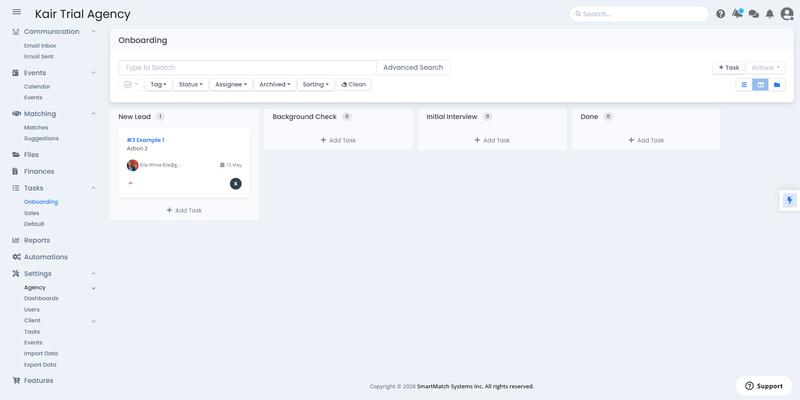
カンバンビューでのオンボーディングボードの例 — タスクは新しいリード、バックグラウンドチェック、初回面接、完了を通じて移動し、上部に完全なフィルタリングと検索コントロールがあります。SmartMatchApp提供
4. チェックリストとテンプレートを使用してプロセスを標準化する
マッチメイキングCRMのタスク管理で最も使われていない機能はチェックリストです — そして、これは単なるTo-Doアイテムの追跡以上のことを行います。
各タスクはワークフローの各ステージに対して複数のチェックリストをサポートしています。例えば:
-
新しいリード:ウェルカムメールを送信 · 連絡先情報を確認 · 受け入れコールをスケジュール
-
バックグラウンドチェック:ドキュメントを要求 · 参照を確認 · 結果とノートを記録
チームメンバーが項目を完了すると、進行状況バーがタスクカード上でリアルタイムに更新されます。どのマネージャーも任意のタスクを開き、クライアントの進捗状況を正確に確認できます — ステータス会議も、Slackスレッドも、推測も不要です。
タスクテンプレートは残りの繰り返し作業を排除します。新しいクライアントごとにチェックリストをゼロから再構築する代わりに、完了したタスクを再利用可能なテンプレートに変換します。そのテンプレートから作成されたすべてのオンボーディングタスクには、適切なチェックリスト、フィールド説明、チーム指示が事前にロードされています。手順はシステムに組み込まれており、誰もそれを覚えておく必要はありません。
各タスクはタイムラインログも保持しており、すべてのステータス変更、再割り当て、更新の完全な監査証跡がタイムスタンプ付きで記録されています。クライアントのオンボーディングで何が起こったのか、いつ起こったのかを常に正確に把握できます。
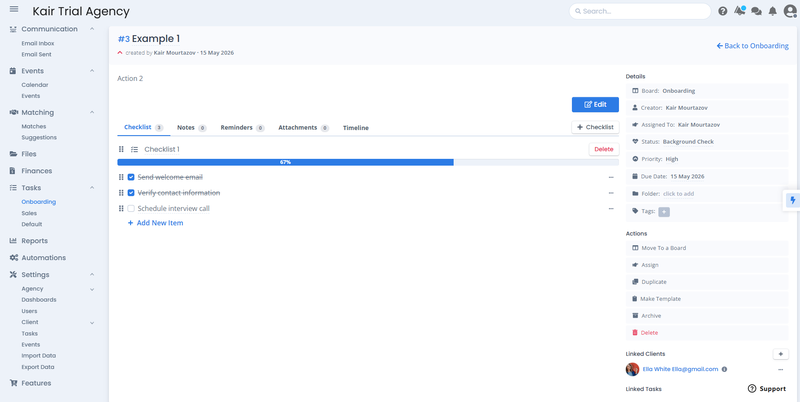
67%完了のオンボーディングタスクの例 — チェックリスト項目はリアルタイムで追跡され、リンクされたクライアントプロフィール、ステータス、優先度、期限が詳細パネルに表示されています。SmartMatchApp提供
5. クライアントをパイプラインで進める:オンボーディングからセールスまで
クライアントをパイプラインで進めるのは、カードを次の列にドラッグするか、タスク内でステータスを手動で更新するだけです。
オンボーディングが完了したら、セールスチームのために新しいタスクを作成する必要はありません。代わりにボードに移動機能を使用します:
タスクを開く → ボードに移動 → 「セールス」を選択 → 保存。
タスクは、完全な履歴、チェックリスト、添付ファイル、ノートを保持したまま、セールスボードに移動します。セールスチームは完全なコンテキストで引き継ぎます。ブリーフィングコールも、「このクライアントはどうなったのか?」という会話も、引き継ぎで情報が失われることもありません。
これはCRMネイティブのタスク管理における最も高いレバレッジの機能の一つです:オンボーディングとセールスの間の引き継ぎが、調整イベントではなくワンクリック操作になります。
6. タスク内での非同期チームコミュニケーション
優れたマッチメイキングCRMには、すべてのタスク内にノートセクションがあり、@メンションをサポートしています — 各タスクを独自のコミュニケーションスレッドに変えます。
別のメールを送信したり、Slackを開いたり、同僚にバックグラウンドチェックを依頼するために電話をスケジュールする代わりに、タスク内で直接入力します:
@チームメイト — バックグラウンドチェックを完了し、完了したら確認してください。
そのチームメンバーは通知を受け取り、作業を完了し、同じスレッドで返信します — 証拠としてドキュメントやスクリーンショットを添付タブを通じて添付します。すべてのやり取りはタスクのチェックリストとリンクされたクライアントプロフィールの隣に記録されます。
ステップが完了すると、タスクは初回面接を担当するチームメンバーに再割り当てされます。彼らは通知を受け取り、すぐにそれを引き継ぎます — 引き継ぎの会話は不要です。
結果として、チームの調整負担はほぼゼロに減少し、すべてのクライアントコミュニケーションとアクションは一箇所で追跡可能になります。
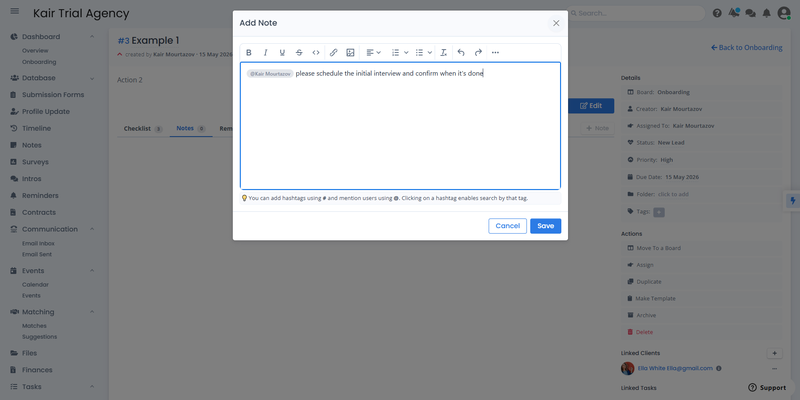
タスク内のノートパネルの例 — チームメンバーはタスク内で直接同僚を@メンションでき、すべてのコミュニケーションをクライアントレコードに結びつけ、メールやチャットに切り替えることなく行えます。SmartMatchApp提供
7. 高度なタスクフィルタリングとチームの可視性
マッチメイキングCRMでのタスクフィルタリングは、マネージャーにチーム全体で何が起こっているのかをリアルタイムで可視化します — スプレッドシートは一切不要です。
任意のボードから、以下の条件でタスクをフィルタリングできます:
-
ステータス — 現在「バックグラウンドチェック」にあるすべてのタスクを一目で確認
-
タグ — リードソース、クライアントタイプ、優先度レベルでフィルタリング
-
割り当てられた人 — 各チームメンバーのアクティブな作業負荷を瞬時に確認
-
期限 — 問題になる前に期限切れまたはリスクのあるタスクを浮き彫りにする
-
リンクされたクライアント — 特定のクライアントプロフィールに関連するすべてのタスクを引き出す
高度な検索レイヤーは、タスク作成者、作成日、リンクされたクライアントのフィルタを追加し、「このチームメンバーが現在持っているアクティブなオンボーディングタスクは何件か?」や「どのクライアントが2週間以上バックグラウンドチェックにいるか?」といった質問に答えます。
8. 日々の業務のエンドツーエンドの例
ここで、タスクとワークフローの自動化フローがどのように機能するか、SmartMatchApp、目的に特化したマッチメイキングCRMプラットフォームの一つでご覧いただけます:

-
新しいクライアントがウェブサイトで受け入れフォームを提出する
-
自動化が即座にオンボーディングタスクを作成し、成功マネージャーに割り当てる
-
成功マネージャーは通知を受け取り、クライアントプロフィールが既にリンクされたタスクを開く
-
彼らはステージのチェックリストを進め、特定のステップでチームメイトに@メンションする
-
各ステップの完了が進行状況バーを更新し、ステータス変更がカードをカンバンボード上で移動させる
-
オンボーディングが完了したら、タスクはセールスボードに移動し、完全な履歴、ノート、添付ファイルが保持される
-
セールスチームは完全なコンテキストでそれを引き継ぎ、すぐにエンゲージメントを開始する
このフロー全体が手動での調整なしで、そしてプラットフォームを離れることなく実行されます。
実例: Group Social 結果: 18ヶ月で20,000人以上のメンバーに成長
マッチメイキングとタスク自動化、構造化されたワークフローを組み合わせることで、Group Socialは急速に拡大しながら、全メンバーベースでの強力なエンゲージメントを維持しました — 手動の調整と分断されたツールでは、このボリュームでの持続は不可能です。
よくある質問
すでにマッチメイキングCRMを使用している場合、別のタスク管理ツールが必要ですか? CRMにネイティブのタスクモジュールが含まれている場合は必要ありません。目的に特化したマッチメイキングプラットフォームは、タスクをクライアントプロフィールに直接結びつけ、AsanaやTrelloのようなスタンドアロンツールをこの用途では不要にします。
マッチメイキングビジネスはどのくらいのボードを作成すべきですか? まずは2つから始めましょう:1つはオンボーディング用、もう1つはセールスまたはアクティブクライアント用です。ワークフローが拡大するにつれてボードを追加します — コーチング、プロジェクト管理、内部業務など。ほとんどのプラットフォームはボードの数に制限を設けていません。
タスクは複数のチームメンバーが作業できますか? 各タスクには1人の主要な担当者がいますが、ノートセクションで@メンションを使って特定のステップで協力することができます。すべての貢献者からの添付ファイルと更新は同じスレッドに記録されます。
タスクテンプレートと通常のタスクの違いは何ですか? テンプレートは再利用可能なタスク構造であり、チェックリスト、説明、指示が事前に組み込まれており、新しいクライアントに適用する際にワークフローをゼロから再構築する必要がありません。通常のタスクは再利用が組み込まれていない一度限りのアイテムです。
クライアントが内部タスクを見ることはありますか? いいえ。タスクは内部チームのツールです。クライアントはメンバーポータル、紹介通知、アンケートとやり取りします — 内部ボードやタスクノートではありません。
タスク自動化はマッチメイキングのワークフロー全体とどのように接続しますか? タスク自動化は大きな自動化エンジンの一部です。オンボーディングタスクを作成する同じシステムが、紹介メール、フォローアップアンケート、マッチ提案をトリガーすることができます — すべてクライアントがフォームを提出するという1つのアクションから。受け入れフォーム、タスク、マッチワークフローは1つの接続されたパイプラインとして機能します。
結論
受け入れフォーム、タスク作成、チーム割り当て、チェックリスト追跡、パイプラインの引き継ぎがすべて同じシステム内で実行され、最初の3つが自動的に行われる瞬間に、日々の業務は調整の問題ではなくなります。
マッチメイキングCRMのタスク、ワークフロー、カンバンボードはプロジェクト管理のアドオンではありません。それは、クライアントがフォームを提出してからセールスチームがクローズするまで、日々の業務を支える運用のバックボーンです — チームが整列し、パイプラインが可視化され、何も抜け落ちない状態です。
続けて読む
この記事は、目的に特化したソフトウェアでマッチメイキングビジネスとコミュニティがどのように運営を拡大するかに関するシリーズの一部です。
👉 フルフレームワークから始めましょう: AIマッチメイキングソフトウェアを使用してコミュニティがエンゲージメントを高める方法 — 5つの実証済みステップ
このシリーズの他の記事:
- マッチメイキングデータベースの設定方法:フィールド、クライアントタイプ、リスト、詳細検索
- マッチメイキングソフトウェアでの紹介、プリセット、マッチ自動化をマスターする方法
- コミュニティマッチメイキングプラットフォームでAIマッチング基準を設定する方法
- マッチメイキングCRMでクライアント受け入れフォームを構築しブランド化する方法
タスク、ワークフロー、日々の業務自動化がライブプラットフォームでどのように連携しているかを見たいですか? SmartMatchApp は、プロフェッショナルなデートマッチメーカー、メンターシッププログラム、非営利団体、クライアント/メンバー関係を大規模に管理するコミュニティ向けに特化されています。
👉 無料のディスカバリーコールを予約し、あなたのユースケースにどのようにマップされるかをご確認ください。