Consejos • 27 de abril de 2026
Cómo Dominar las Presentaciones, Preajustes y Automatización de Coincidencias en su Software de Matchmaking
Aprenda tres de las capacidades más impactantes en el software de matchmaking moderno: Presentaciones, Preajustes y Automatización de Coincidencias. Ya sea que sea un casamentero solitario gestionando una base de datos en crecimiento o un equipo manejando cientos de perfiles de clientes, dominar estas herramientas transformará la forma en que trabaja.
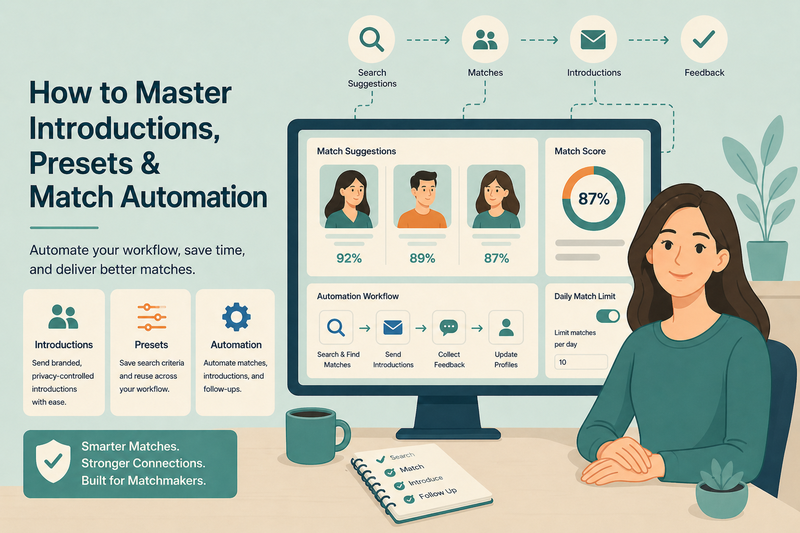
Por Kair Mourtazov, Especialista de Producto de SmartMatchApp
Tiempo de lectura: 6 minutos
Resumen de 30 Segundos (TL;DR)
Dominar las Introducciones, Preajustes y Automatización en tu plataforma de emparejamiento convierte un proceso manual en un sistema escalable y autónomo.
-
Envía introducciones con marca y control de privacidad sin salir de tu CRM
-
Utiliza Preajustes para guardar criterios de búsqueda y reutilizarlos en cada función
-
Automatiza todo el ciclo de emparejamiento — desde sugerencias hasta envíos de introducciones y recolección de feedback
-
Controla el volumen diario de emparejamientos con límites configurables para proteger la experiencia del cliente
-
Encadena múltiples pasos de automatización en un flujo de trabajo que se ejecuta sin intervención manual
Cuando se configura correctamente, el software avanzado de emparejamiento no solo apoya tu negocio — lo gestiona.
Tabla de Contenidos
-
¿Qué son las Introducciones en un CRM de Emparejamiento?
-
Características Clave del Módulo de Introducciones
-
¿Qué son los Preajustes y por qué son importantes?
-
Características Clave del Módulo de Preajustes
-
Cómo la Automatización de Emparejamientos se Encarga de tu Trabajo Diario
-
Características Clave del Módulo de Automatizaciones
-
Beneficios Clave para tu Negocio de Emparejamiento
-
Uniéndolo Todo: Un Ejemplo de Flujo de Trabajo en el Mundo Real
-
Próximo Paso
Dirigir un negocio de emparejamiento exitoso significa hacer más con menos — menos trabajo manual, menos repetición y menos tiempo dedicado a tareas que deberían ocurrir automáticamente. Este artículo se basa en un podcast del equipo detrás de una de las plataformas de CRM de emparejamiento líderes, que recorre tres de las capacidades más impactantes en software de emparejamiento moderno: Introducciones, Preajustes y Automatización de Emparejamientos. Ya sea que seas un emparejador solitario gestionando una base de datos en crecimiento o un equipo manejando cientos de perfiles de clientes, dominar estas herramientas transformará la forma en que trabajas.

1. ¿Qué son las Introducciones en un CRM de Emparejamiento?
Una Introducción es el paso formal donde conectas a dos clientes emparejados compartiendo los perfiles del otro — de manera selectiva y profesional. Es uno de los momentos más importantes en el proceso de emparejamiento, y las plataformas modernas de emparejamiento te dan control total sobre cómo sucede.
Al enviar una Introducción, puedes elegir exactamente qué campos de perfil, fotos y archivos multimedia ve cada cliente. Esto protege la privacidad del cliente mientras ofrece una primera impresión convincente.
2. Características Clave del Módulo de Introducciones
El software avanzado de emparejamiento maneja todo el proceso de introducción desde un solo sistema — no se requieren herramientas de terceros. Las capacidades clave típicamente incluyen:
-
Seleccionar qué campos son visibles en cada lado de la introducción (por ejemplo, ocultar información de contacto hasta que ambos clientes acepten)
-
Adjuntar fotos, videos y documentos para personalizar cada introducción
-
Rastrear el estado de cada introducción: enviada, vista, aceptada o rechazada
-
Permitir a los clientes ver introducciones y proporcionar feedback a través de su portal de miembros
Una vez que se envía una introducción, la plataforma la registra automáticamente en ambos perfiles de cliente para que tu equipo siempre tenga un historial completo a simple vista. Las plataformas líderes en la industria como SmartMatchApp demuestran cómo este módulo puede ser completamente personalizado y adaptado para coincidir con el flujo de trabajo de cualquier agencia.
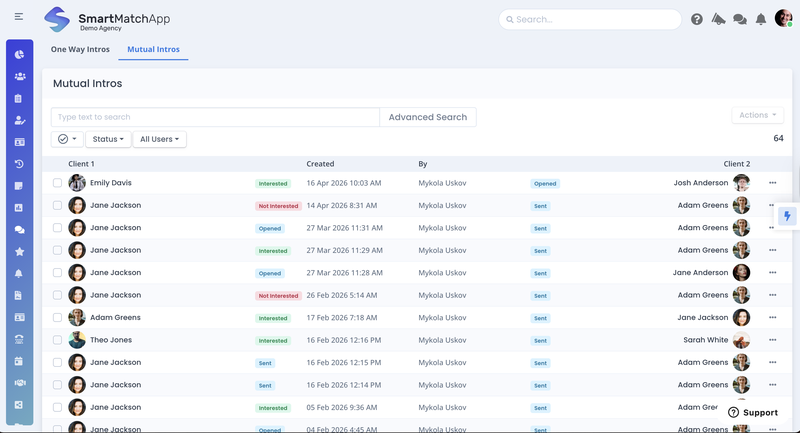
‘Interfaz de Introducciones Mutuas’ destacando la sección para rastrear introducciones de miembros y feedback automatizado de clientes. Cortesía de SmartMatchApp.
3. ¿Qué son los Preajustes y por qué son importantes?
Los Preajustes son configuraciones de búsqueda guardadas que te permiten filtrar y emparejar rápidamente clientes según criterios predefinidos. En lugar de reconstruir tus filtros de búsqueda desde cero cada vez, creas un Preajuste una vez y lo reutilizas en todo tu flujo de trabajo.
Esto es especialmente poderoso para agencias que trabajan con diferentes segmentos de clientes — por ejemplo, un preajuste para clientes que buscan relaciones a largo plazo y otro para eventos de networking profesional.
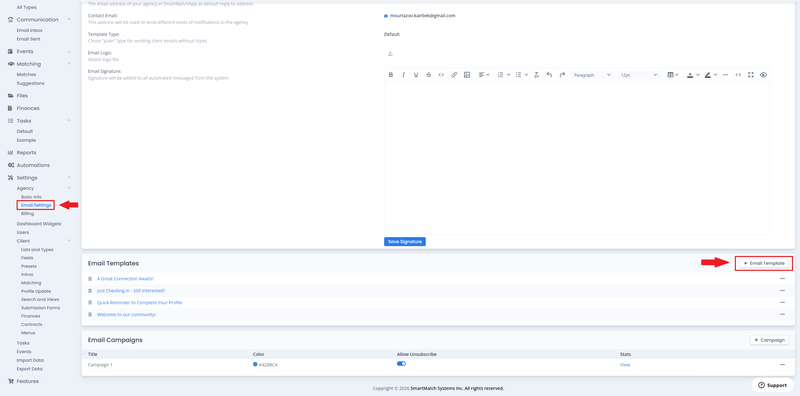
‘Interfaz de Configuración de Correo Electrónico’ destacando la sección de ‘Plantillas de correo electrónico’ para crear mensajes de introducción profesional de un solo clic y comunicaciones automatizadas de clientes. Cortesía de SmartMatchApp.
4. Características Clave del Módulo de Preajustes
Una plataforma de emparejamiento bien construida permite a las agencias gestionar múltiples configuraciones de preajustes desde una vista centralizada, facilitando la escalabilidad de las operaciones sin sacrificar la consistencia. Las características principales a buscar incluyen:
-
Crear múltiples grupos de Preajustes adaptados a diferentes funciones: Introducciones, Solicitudes de Actualización de Perfil, Sugerencias de Búsqueda y más
-
Asignar un Grupo de Preajustes de Búsqueda Predeterminado para acceso de un clic a tus filtros más utilizados
-
Reutilizar un solo grupo de preajustes en múltiples funciones para eliminar configuraciones redundantes
-
Organizar y reordenar grupos de preajustes para que tus configuraciones más utilizadas estén siempre al frente
-
Compartir la lógica de preajustes entre tu equipo para un emparejamiento estandarizado y consistente
5. Cómo la Automatización de Emparejamientos se Encarga de tu Trabajo Diario
La automatización es donde el software moderno de emparejamiento ofrece su mayor valor operativo. Un motor de automatización avanzado te permite construir flujos de trabajo inteligentes desencadenados por eventos específicos — para que el sistema funcione en segundo plano mientras te enfocas en tus clientes.
Como se demuestra en este seminario web por el equipo de SmartMatchApp — una referencia de la industria para plataformas de CRM de emparejamiento — los flujos de trabajo automatizados de extremo a extremo pueden manejar todo, desde la búsqueda de sugerencias de emparejamiento hasta el envío de introducciones y la recolección de feedback, todo sin intervención manual.
6. Características Clave del Módulo de Automatizaciones
Las plataformas modernas de emparejamiento soportan la automatización de flujos de trabajo de múltiples pasos a lo largo de todo el ciclo de vida del cliente. Las capacidades clave de automatización incluyen:
-
Desencadenar flujos de trabajo a partir de docenas de eventos: un emparejamiento moviéndose a un nuevo grupo, un cliente completando una actualización de perfil, la firma de un contrato y más
-
Utilizar una acción de Sugerencias de Búsqueda para encontrar y mostrar automáticamente nuevos emparejamientos basados en criterios predefinidos
-
Controlar cuántos emparejamientos se mueven de Sugerencias a Emparejamientos activos por día con una configuración de Límite configurable
-
Enviar automáticamente introducciones por correo electrónico y mensaje de texto SMS para maximizar el compromiso del cliente
-
Utilizar una acción de Cambiar Perfil de Cliente para actualizar automáticamente las preferencias de emparejamiento, ubicación, tipos y campos personalizados basados en cualquier desencadenante
-
Encadenar múltiples acciones en un solo flujo de trabajo: buscar → emparejar → introducir → notificar → recolectar feedback
7. Beneficios Clave para tu Negocio de Emparejamiento
-
Reducir drásticamente el tiempo dedicado a tareas de emparejamiento manuales y repetitivas
-
Asegurar que ningún cliente se pierda con seguimientos y recordatorios automatizados
-
Ofrecer una experiencia más consistente y profesional a cada cliente
-
Escalar tu negocio sin escalar tu carga de trabajo
-
Generar más ingresos manteniendo a los clientes comprometidos y avanzando en tu pipeline
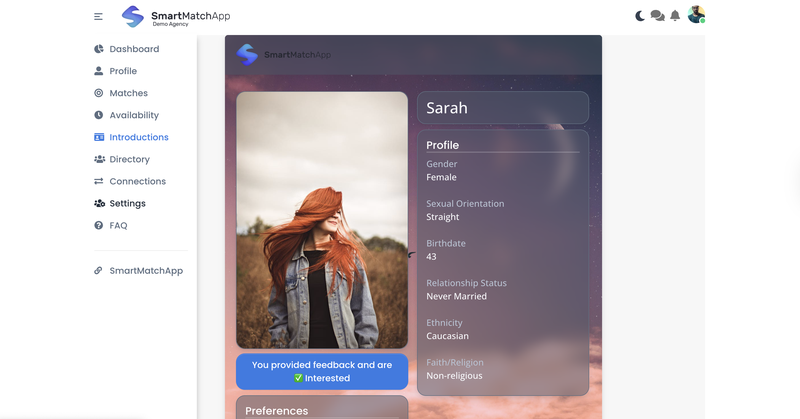
‘Interfaz de Feedback de Introducción’ destacando feedback y comunicaciones personalizadas de introducción. Cortesía de SmartMatchApp.
8. Uniéndolo Todo: Un Ejemplo de Flujo de Trabajo en el Mundo Real
Aquí se muestra cómo las Introducciones, Preajustes y Automatizaciones trabajan juntas en un solo flujo de trabajo continuo — como se ilustra en el seminario web usando una plataforma de emparejamiento líder como referencia:
-
Un nuevo cliente completa su perfil a través de un formulario web personalizado
-
Una automatización desencadena la acción de Sugerencias de Búsqueda usando un Preajuste guardado
-
Los mejores emparejamientos se mueven al Grupo de Emparejamientos del cliente (con un límite diario que controlas)
-
Otra automatización se activa y envía un correo electrónico de Introducción con marca — y opcionalmente un SMS
-
El cliente inicia sesión en su portal de miembros, revisa la introducción y envía feedback
-
Una automatización final añade al cliente a una lista de seguimiento y envía una encuesta tres días después
Toda esta secuencia se ejecuta sin pasos manuales de tu equipo.
Resumen
Las Introducciones, Preajustes y Automatizaciones no son características independientes — son tres capas del mismo sistema trabajando juntas.
Cuando tus introducciones están configuradas para mostrar la información correcta, tus preajustes están guardando la lógica de búsqueda correcta y tus automatizaciones están desencadenando las acciones correctas, tu plataforma de emparejamiento deja de ser una base de datos y comienza a ser un motor de emparejamiento completamente operativo.
Principios clave:
-
Las introducciones dan a los clientes una primera impresión profesional y centrada en la privacidad
-
Los preajustes eliminan la configuración repetitiva de búsqueda y estandarizan el flujo de trabajo de tu equipo
-
Las automatizaciones encadenan todo el ciclo de emparejamiento — desde la sugerencia hasta el feedback — sin trabajo manual
-
Los límites diarios de emparejamiento y la entrega por SMS mantienen el compromiso del cliente alto sin abrumarlos
Continuar Leyendo
Esta guía es parte de una serie sobre cómo las comunidades aumentan el compromiso utilizando software de emparejamiento con IA. El marco completo cubre cinco pasos probados — desde construir una base de datos de miembros estructurada, hasta automatizar introducciones y recolección de feedback, escalar con automatización y capturar datos de miembros con formularios de ingreso sin problemas.
👉 👉 Comienza con el marco completo: Cómo las Comunidades Aumentan el Compromiso Usando Software de Emparejamiento con IA — 5 Pasos Probados
Más en esta serie:
- Cómo Configurar una Base de Datos de Emparejamiento: Campos, Tipos de Clientes, Listas y Búsqueda Avanzada
- Cómo Configurar Criterios de Emparejamiento con IA en tu Plataforma de Emparejamiento Comunitario
- Cómo Automatizar tus Operaciones Diarias con Tareas y Flujos de Trabajo en un CRM de Emparejamiento
- Cómo Construir y Marcar tus Formularios de Ingreso de Clientes en un CRM de Emparejamiento
Próximo Paso
Si deseas explorar cómo el emparejamiento con IA puede adaptarse a tu comunidad, plataformas modernas como SmartMatchApp proporcionan soluciones completas para gestionar datos, automatizar introducciones y escalar el compromiso.
👉Reserva una demostración para ver cómo funciona en tu caso específico.